
UberEats Clone -
Flutter PoweredLaunch Your Own Food Delivery App in 7 Days
A production-ready UberEats clone starting at $2,999. 100% source code. No monthly fees. Free 30-days support.

Here’s What You Get
With Oyelabs’ UberEats Clone, you get a robust, ready-to-launch food delivery marketplace built for rapid scaling and maximum profitability.

Launch Fast

Brand Your Way

User-Friendly Design

Secure Server Setup

App Store Ready

Free 30-Day Support
From Idea to Live Food Delivery in 1 Week
OyeLabs’ UberEats clone is a plug-and-play solution for entrepreneurs who want to start a food delivery business without the usual delays and development headaches. Built with modern technology, it offers smooth, intuitive experiences for customers, restaurant partners, and delivery drivers.
With advanced features like order tracking, multi-restaurant management, and seamless payment integration, this clone ensures your business is operational fast while maintaining complete ownership of your brand and IP.
Skip the $100k Risk and 18-month Timeline of Custom Development
Building a custom app is an 18-month, multi-million dollar gamble riddled with hidden costs and development delays. Oyelabs’ White-Label UberEats Clone bypasses this nightmare. Our solution comes with 100% Source Code Ownership and eliminates the three biggest startup risks:

Time-to-Market

Budget Overruns

Tech Dependence
Don’t Just Clone the Platform. Clone the Success.
Oyelabs provides the technology and the strategy to build a profitable food delivery ecosystem. Zero compromise on quality, maximum speed to launch.
Hear From Our Happy Clients

Arthur Jacobs / CEO
"Collaborating with Oyelabs for our UberEats-like food delivery app was amazing. They understood our business needs from the start and delivered a smooth, feature-packed platform that our customers love."

Graeme Lewis / Co-Founder
“Oyelabs’ food delivery app development is exceptional. The app is fast, reliable, and easy to use. Their team provided constant support and ensured everything ran perfectly highly recommend them for launching an UberEats clone.”

Anna Martinez / CTO
“The UberEats clone developed by Oyelabs exceeded our expectations. It’s user-friendly, visually appealing, and fully functional. Both our customers and restaurant partners enjoy the seamless experience, and managing operations through the admin panel is effortless.”
Hear From Our Happy Clients
Arthur Jacobs / CEO
"Collaborating with Oyelabs for our UberEats-like food delivery app was amazing. They understood our business needs from the start and delivered a smooth, feature-packed platform that our customers love."
Graeme Lewis / Co-Founder
“Oyelabs’ food delivery app development is exceptional. The app is fast, reliable, and easy to use. Their team provided constant support and ensured everything ran perfectly highly recommend them for launching an UberEats clone.”
Anna Martinez / CTO
“The UberEats clone developed by Oyelabs exceeded our expectations. It’s user-friendly, visually appealing, and fully functional. Both our customers and restaurant partners enjoy the seamless experience, and managing operations through the admin panel is effortless.”
Stories That Speak for Themselves
Unfiltered Feedback from Those Who’ve Built With Us.
Rita Pedroza
Excursionist | United States
Nathan Beckles
Poptup | United Kingdom
Alejandro Trejo
Kwiki | Mexico
Brian McDaniel
Fall-in | United States
Angelico Cabredo
Philregis | Philippines
Features You Get With Our UberEats Clone

User Registration

GPS Location Picker

Easy Search Filters

Browse Restaurants

Add To Cart

Secure Payment Gateway

Real-Time Tracking

Order History

Promo Codes

In-App Chat

Wishlist Management

Ratings & Reviews

Tip Driver Option

Built-In POS

Veg or Non-Veg Marking

Menu Management System

Packaging Charges

Earnings Dashboard

Real-Time Order Alerts

Order Acceptance Toggle

Payout Management

Inventory Tracking Tool

Custom Timings Setup

Performance Analytics

Special Offer Creation

Order History Viewing

Vehicle Type Setup

Min/Max Delivery Distance

Availability Status Management

Accept/Reject Delivery

Driver Registration

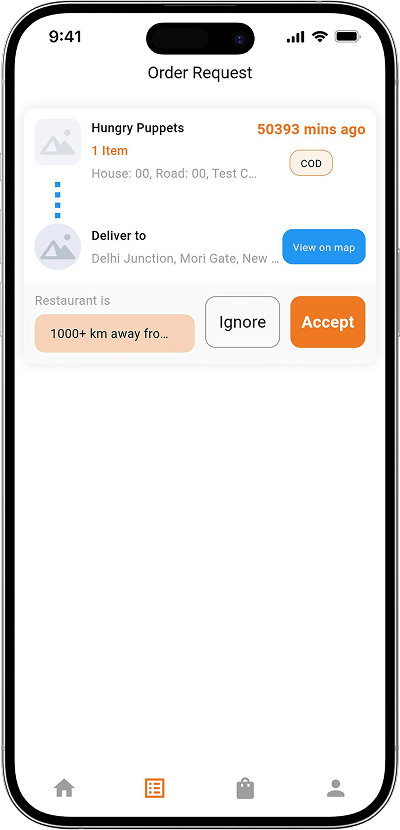
Accept Orders

Route Optimization

Delivery Status

Earnings Overview
Real-Time Navigation
In-App Chat

User, Driver & Restaurant Management

Revenue Management

Zone & Area Setup with Map Tool

User Account Blocks/Unblocks

Order Assignment/Reassignment

Dashboard Overview

Revenue Analytics

Payment Management

Promotions Control

Role Assignment

System Security

Multi-Language Settings
- Customer Features
-

User Registration
Allows customers to quickly sign up using email, phone, or social media, creating secure profiles for easy food ordering and tracking. GPS Location Picker
Detects user location automatically or manually, ensuring accurate restaurant listings, delivery zones, and faster food delivery experiences. Easy Search Filters
Lets users sort restaurants by cuisine, ratings, delivery time, or pricing to find exactly what they’re craving instantly. Browse Restaurants
Customers can explore nearby restaurants, view menus, photos, reviews, and delivery times, helping them make informed ordering decisions easily. Add To Cart
Enables users to add multiple dishes from the same restaurant to a single order before confirming checkout or payment. Secure Payment Gateway
Supports safe online payments through credit cards, wallets, and more, protecting user data with end-to-end encryption and reliable transaction security. Real-Time Tracking
Shows live delivery progress from restaurant to doorstep with GPS-based updates, keeping customers informed every step of the way. Order History
Stores all previous orders, letting users reorder favorites, track spending, and review dishes they’ve previously enjoyed. Promo Codes
Customers can apply promotional offers or coupons during checkout to save money and enjoy rewards for frequent food orders. In-App Chat
Enables direct communication between customers, restaurants, and delivery partners to resolve questions or order updates quickly. Wishlist Management
Lets users save favorite restaurants or dishes for future orders, making the reordering process simple and convenient. Ratings & Reviews
Customers can rate restaurants and dishes honestly, helping improve quality and guiding others to better dining experiences. Tip Driver Option
Allows customers to tip delivery partners digitally after successful delivery, promoting satisfaction and driver motivation within the app. - Restaurant Features
-
Built-In POS
Simplifies order processing and payments by offering restaurants an integrated POS system to manage sales and receipts efficiently. Veg or Non-Veg Marking
Helps restaurants tag dishes clearly as vegetarian or non-vegetarian, improving food transparency and user experience. Menu Management System
Allows restaurant owners to add, edit, or remove menu items, update prices, and manage food availability in real time. Packaging Charges
Lets restaurants include separate packaging fees, giving flexibility in pricing while maintaining transparency with customers. Earnings Dashboard
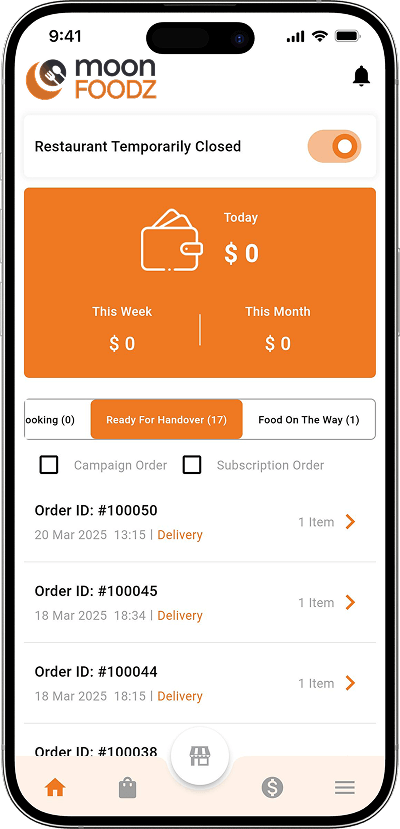
Provides real-time insights into sales, commissions, and payouts, helping restaurants track income and monitor business performance. Real-Time Order Alerts
Notifies restaurants instantly when new orders arrive, ensuring prompt preparation and reducing delivery delays. Order Acceptance Toggle
Enables restaurants to accept or reject incoming orders depending on kitchen availability or business hours. Payout Management
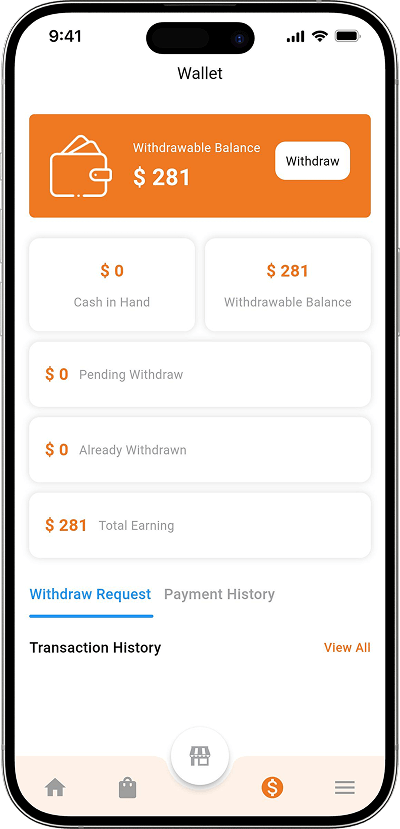
Helps restaurants manage and track earnings, pending payments, and withdrawals directly from their dashboard. Inventory Tracking Tool
Monitors ingredient stock levels in real time to avoid shortages and optimize kitchen operations efficiently. Custom Timings Setup
Lets restaurants set working hours, break times, and delivery windows to control order availability. Performance Analytics
Provides insights into sales data, top-selling dishes, and customer behavior to improve business decisions. Special Offer Creation
Allows restaurants to create and manage discounts or combo deals to attract more customers and boost sales. - Delivery Driver Features
-
Order History Viewing
Drivers can view all past deliveries, helping them track completed jobs, earnings, and performance. Vehicle Type Setup
Allows drivers to register their vehicle type (bike, scooter, car) for better route and delivery management. Min/Max Delivery Distance
Enables drivers to set preferred delivery distances, helping them manage time efficiently and improve the delivery experience. Availability Status Management
Lets drivers toggle availability on or off, controlling when they’re open to accept delivery requests. Accept/Reject Delivery
Gives drivers flexibility to accept or decline orders based on convenience, location, or workload. Driver Registration
Allows delivery personnel to sign up, upload documents, and get verified easily through a secure onboarding system. Accept Orders
Drivers receive live order notifications and can accept jobs instantly to start deliveries quickly. Route Optimization
Automatically suggests the shortest and fastest routes using GPS navigation, saving time and fuel costs. Delivery Status
Lets drivers update customers and restaurants about their current progress, from pickup to delivery completion. Earnings Overview
Displays total income, bonuses, and incentives in real time, helping drivers track performance and financial progress. Real-Time Navigation
Integrated maps guide drivers turn-by-turn, ensuring quick and accurate deliveries every time. In-App Chat
Allows direct messaging between drivers, restaurants, and customers for order updates or clarification without phone calls. - Admin Panel
-
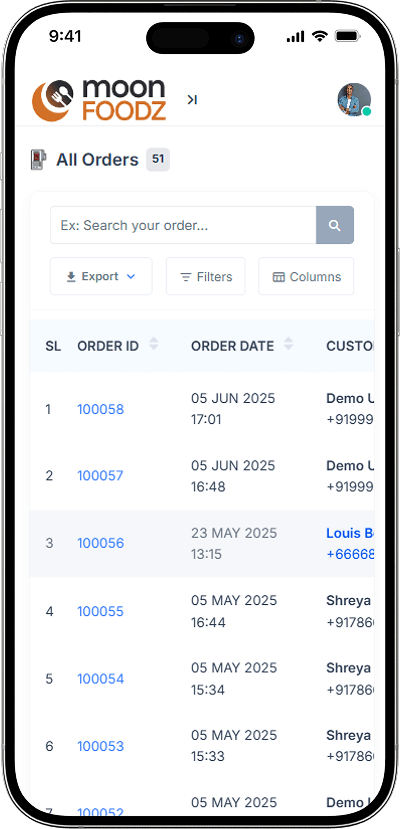
User, Driver & Restaurant Management
Gives full control over user, driver, and restaurant data, including verification, onboarding, and performance monitoring. Revenue Management
Tracks commissions, total sales, and platform revenue with detailed financial analytics to ensure smooth cash flow. Zone & Area Setup with Map Tool
Admins can define delivery zones using an integrated map tool to manage restaurant and driver coverage effectively. User Account Blocks/Unblocks
Allows admins to restrict or reinstate accounts based on platform policies, ensuring a secure and fair ecosystem. Order Assignment/Reassignment
Lets admins assign new orders or reassign existing ones if drivers face connectivity issues or delivery delays. Dashboard Overview
Offers a quick summary of platform activity, including active users, live orders, and revenue updates in real time. Revenue Analytics
Provides graphical insights into business performance, growth trends, and income sources for strategic planning. Payment Management
Monitors transactions, refunds, and settlements securely, keeping platform financials transparent and organized. Promotions Control
Admins can create, edit, or manage platform-wide promo campaigns and discount offers effortlessly. Role Assignment
Allows assigning roles like manager, moderator, or support staff with specific permissions for better team control. System Security
Implements encrypted data storage and fraud detection to ensure a safe and reliable food delivery ecosystem. Multi-Language Settings
Supports multiple languages, making the app accessible to users and partners across different regions and demographics.
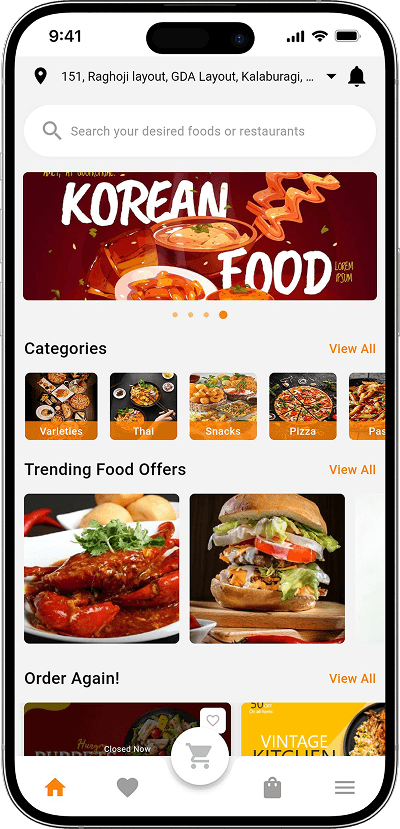
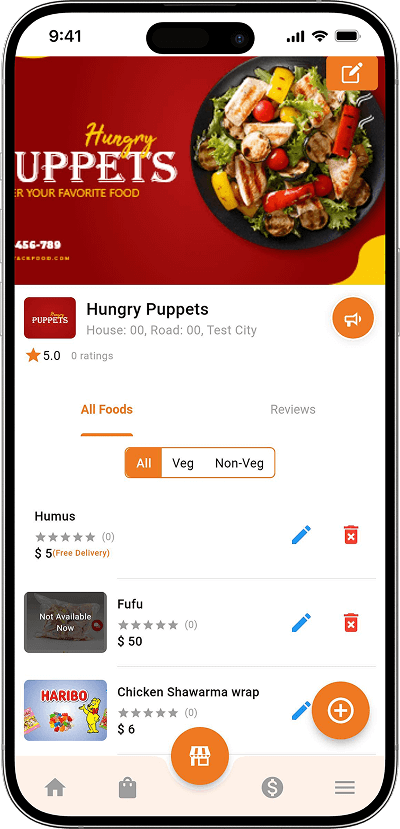
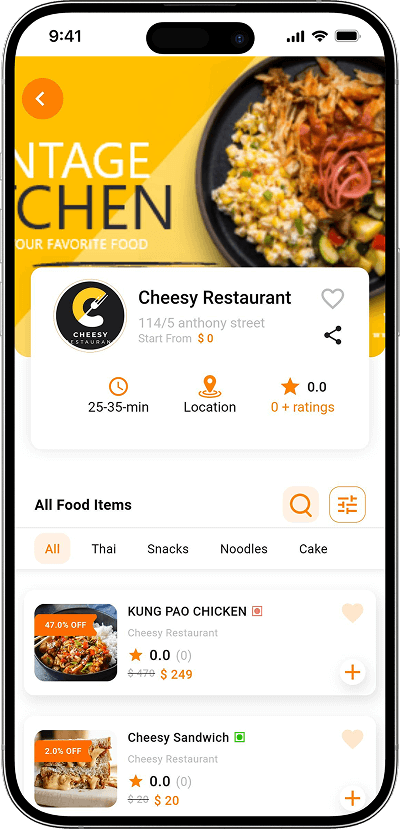
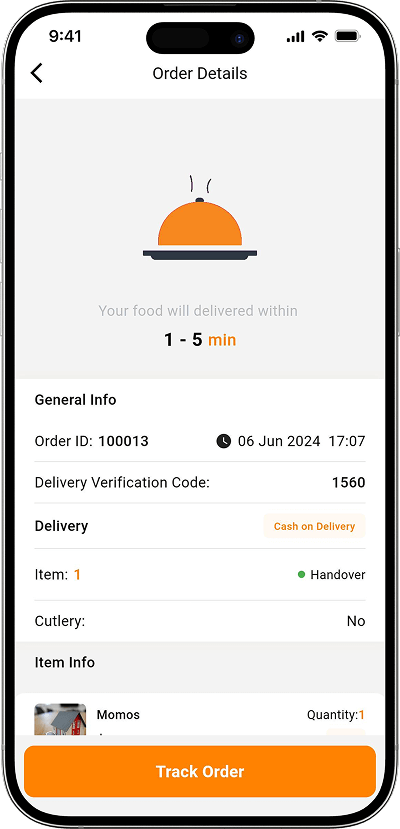
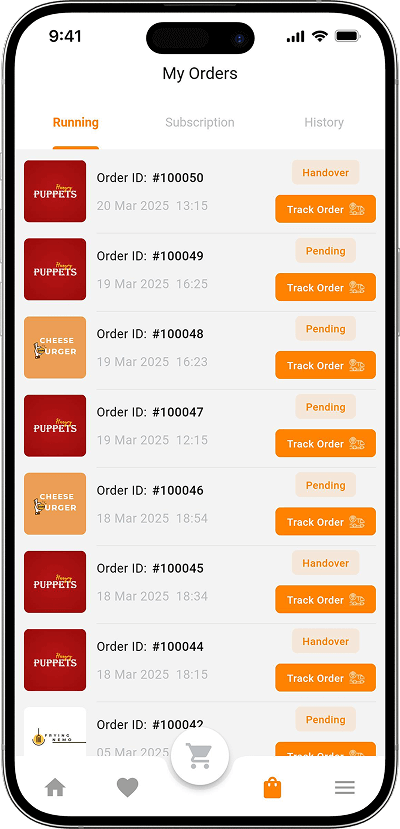
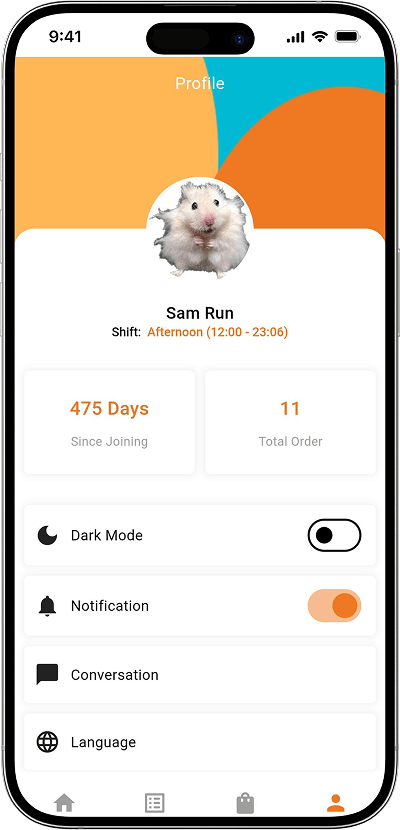
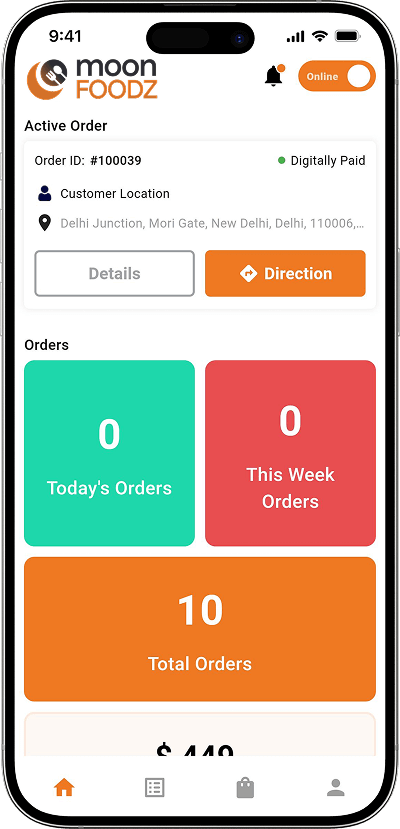
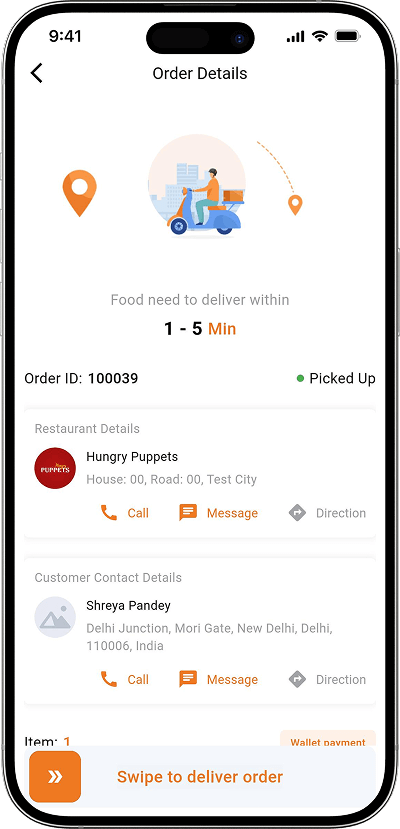
Screens of Our New-Edge UberEats Clone
Explore More Features of Our UberEats Clone
Schedule Orders

Push Notifications

Contactless Delivery

Reorder Favorite

Saved Addresses

Order Cancellation

Manage Driver Handoffs

Customer Feedback View

Kitchen Display System
Set Delivery Radius

Daily Sales Report
Staff Access Control
Order History

Delivery Alerts

Ratings & Reviews

GPS Tracking

Incentive Tracking

Earnings Withdrawal

Feature Toggles

Customer Support Tools

Real-Time Reports

Data Backup

Performance Monitoring

Custom UI Control
- For Customers
-
Schedule Orders
Lets users pre-book food deliveries for specific dates and times, ensuring meals arrive exactly when they’re needed, without last-minute rushes. Push Notifications
Send instant alerts about order updates, offers, and restaurant deals, keeping users informed and engaged throughout their food ordering journey. Contactless Delivery
Allows customers to choose no-contact delivery, ensuring safe, hygienic handoffs between drivers and users during every order. Reorder Favorite
Enables users to reorder their favorite meals with one click, saving time and improving convenience for frequent customers. Saved Addresses
Lets users store multiple delivery addresses like home, work, or friends’ places to simplify and speed up future food orders. Order Cancellation
Allows users to cancel orders before preparation begins, offering flexibility and transparency in managing food deliveries. - For Restaurants
-
Manage Driver Handoffs
Simplifies order transfers between kitchen staff and delivery drivers, ensuring accurate and timely handoffs every time. Customer Feedback View
Displays customer reviews and ratings, helping restaurants understand satisfaction levels and improve food quality or service. Kitchen Display System
Digitally manages incoming orders on a screen, reducing confusion, improving efficiency, and speeding up preparation. Set Delivery Radius
Lets restaurants define their delivery zones to serve customers efficiently and avoid unnecessary long-distance deliveries. Daily Sales Report
Generates automatic sales summaries, giving restaurants insights into daily earnings, top-selling dishes, and revenue patterns. Staff Access Control
Allows restaurant owners to assign different permissions to staff, ensuring secure management of sensitive business operations. - For Delivery Driver
-
Order History
Keeps a record of all completed deliveries, allowing drivers to review past orders and monitor performance easily. Delivery Alerts
Sends instant notifications about new orders or updates, helping drivers stay informed and ready for quick action. Ratings & Reviews
Displays customer feedback for each completed order, motivating drivers to maintain high service standards. GPS Tracking
Uses GPS navigation to guide drivers through the fastest routes, ensuring timely and accurate food deliveries. Incentive Tracking
Shows drivers their bonuses, targets, and rewards earned from completing deliveries efficiently and maintaining customer satisfaction. Earnings Withdrawal
Allows drivers to view and withdraw earnings directly from the app through secure and reliable payment options. - For Admin
-
Feature Toggles
Lets admins activate or deactivate specific features instantly, providing full control over platform customization and scalability. Customer Support Tools
Gives admins integrated tools for live chat, complaint tracking, and query resolution to maintain strong user relationships. Real-Time Reports
Provides live analytics of orders, revenue, and activity across the platform for better business insights and performance tracking. Data Backup
Automatically saves important platform data, ensuring business continuity and protection against data loss or system failures. Performance Monitoring
Tracks app speed, uptime, and user activity to ensure consistent platform performance and user satisfaction. Custom UI Control
Allows admins to adjust layout, colors, and design elements to match brand identity and enhance user experience.
Powerful Add-Ons to Supercharge Your UberEats Clone

RTL Language Support

Loyalty and Rewards Programs

Icons Collection

Multi-Restaurant Support for a Single Owner

Split Payment Option

Staff Access Control

Crypto Payment

Restaurant Own Driver

Voice Search

Heatmap
Powerful Add-Ons to Supercharge Your Airbnb Clone
RTL Language Support
Loyalty and Rewards Programs
Icons Collection
Multi-Restaurant Support for a Single Owner
Split Payment Option
Staff Access Control
Crypto Payment
Restaurant Own Driver
Voice Search
Heatmap
Your Best Choice for a Food Delivery App
Feature/Approach |
OyeLabs’s UberEats Clone |
Other Readymade Solutions |
In-House Development Team |
|---|---|---|---|
| Launch Time | 2-4 weeks | 1-4 months | 6-24 months |
| Price | Starts at $2,999 | Starts at $4,000 | $40,000-$200,000 |
| Customization | 100% | Limited | High but Expensive |
| Ownership | Full | Shared/Restricted | Full |
| Maintenance | 30 Days Free Support | Paid | In-House Resources |
| Cost Efficiency | High ROI | Moderate | High Cost |
| Scalability | Fully Scalable | Limited | Depends on Team Expertise |
Your Best Choice for a Food Delivery App
Feature/Approach |
OyeLabs’s UberEats Clone |
Other Readymade Solutions |
In-House Development Team |
|---|---|---|---|
| Launch Time | 2-4 Weeks | 1-4 Months | 6-24 Months |
| Price | Starts at $2,999 | Starts at $4,000 | $40,000-$200,000 |
| Customization | 100% | Limited | High but Expensive |
| Ownership | Full | Shared / Restricted | Full |
| Maintenance | 30 Days Free Support | Paid | In-House Resources |
| Cost Efficiency | High ROI | Moderate | High Cost |
| Scalability | Fully Scalable | Limited | Depends on Team Expertise |
Technologies Used
Case Study
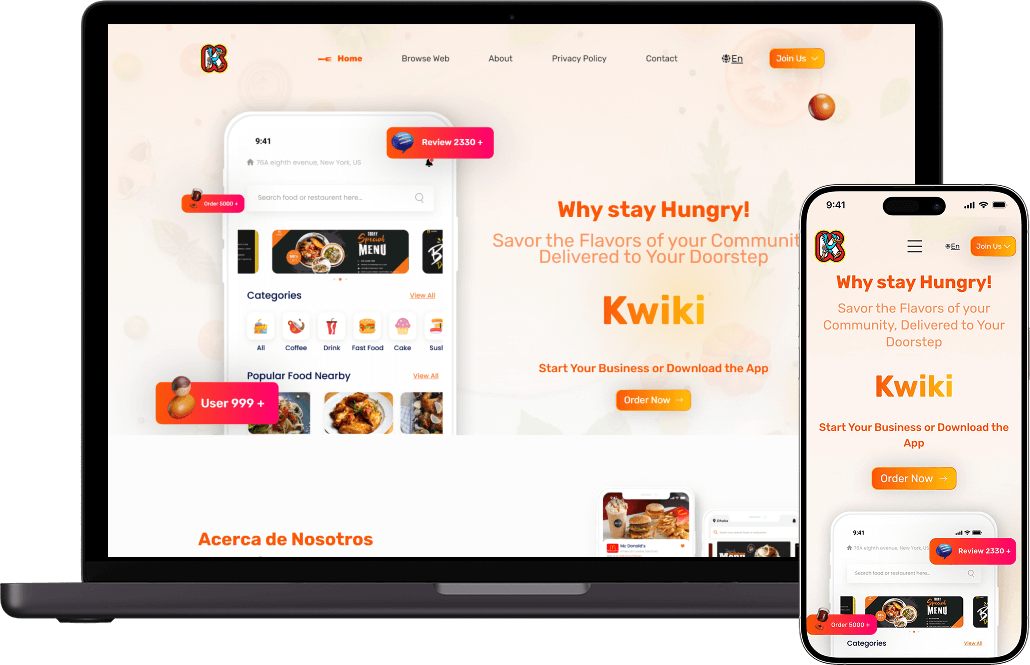
Kwiki -

Mexico
Launched a Full-Scale Food Delivery App in One Week
Kwiki, based in Mexico, successfully launched a full-featured food delivery app using our UberEats clone script. The platform demonstrates how entrepreneurs can quickly start a scalable, user-friendly, and secure food delivery business with a ready-made, white-label solution boosting customer engagement and streamlining restaurant operations in record time.
4 Easy Steps to Launch Your Own Food Delivery Platform

Requirements Gathering

Design & Branding

Development & Launch

Handover & Support
Launch Your UberEats-Like Platform Now
Don’t let your competitors launch first. Talk to our experts today and see how fast you can go from idea to launch.