On-Demand Grocery Delivery App Development Company
- ISO 9001 and ISO 27001 certified
- Rated 4.8/5 by 100+ companies
- Android, iOS and web
What Does Our Grocery Delivery App Development Solution Include?
Customer Grocery Delivery App
Customers set their location, browse categories, search products, fill a cart and pay in a few taps, then follow the order to their door.
Delivery Partner App
Drivers go online when they are free, accept nearby orders, navigate to the store and the customer, and see their earnings for every trip.
Store Owner App and Panel
Each store manages its products, prices and stock, accepts or prepares incoming orders and hands them to the driver at pickup.
Grocery Delivery Admin Dashboard
Your team approves stores and drivers, sets taxes, commissions and promo codes, watches live orders and reads the reports.
One platform, four apps, one backend.
See how the customer, store, driver and admin sides fit your grocery business.
Explore Our Grocery Delivery App Demo and Screens
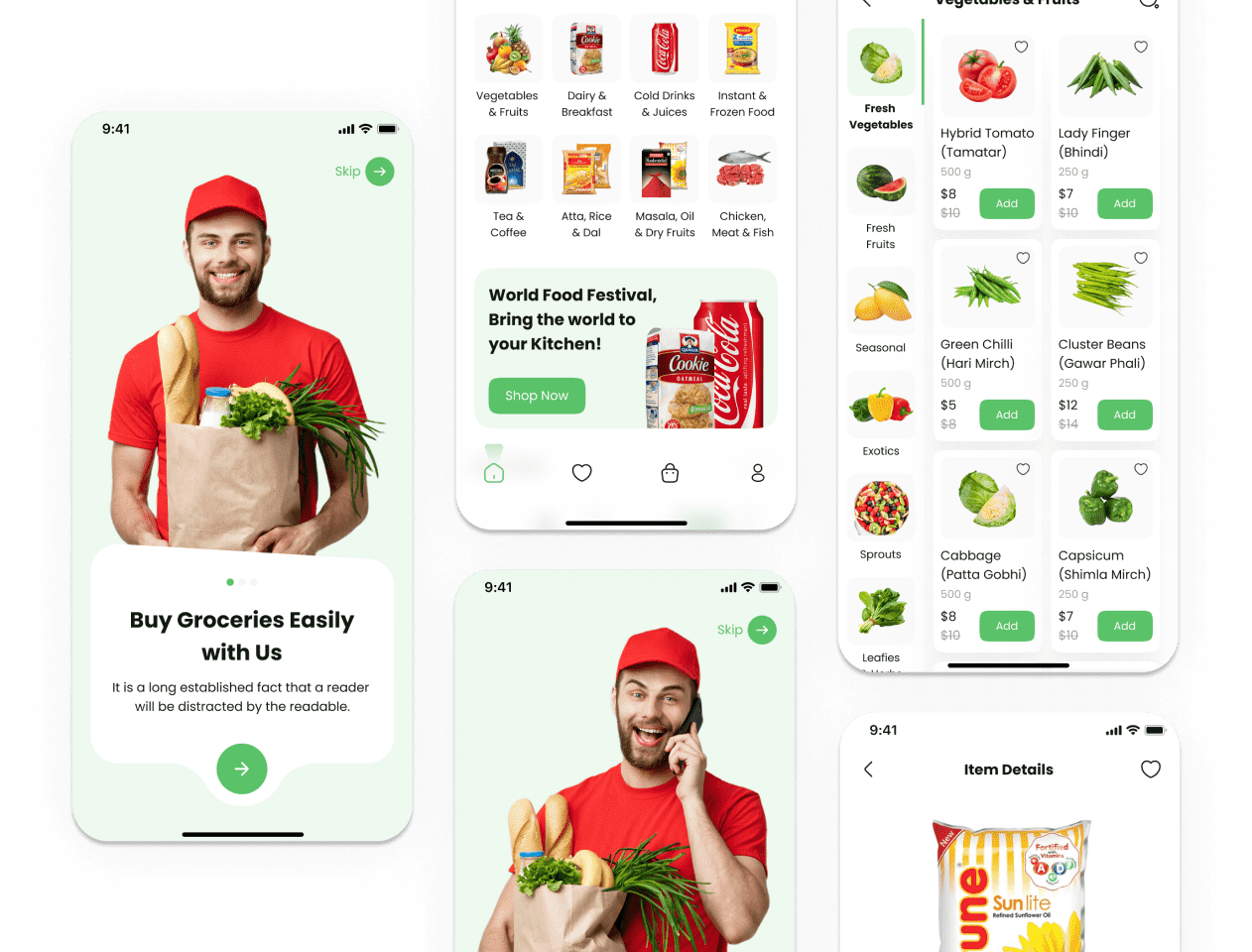
Customer App Screens
Onboarding, category browsing, product listings and product details, through to the cart and checkout.
Delivery Partner App Screens
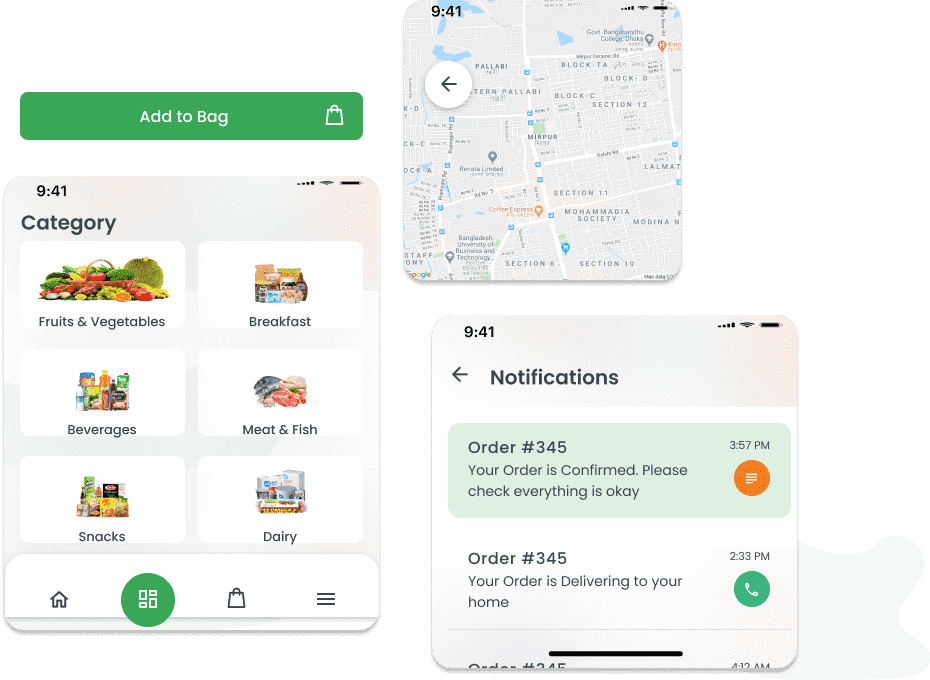
Sign-in, saved addresses, order history and order status screens used by delivery partners.
Store Owner App Screens
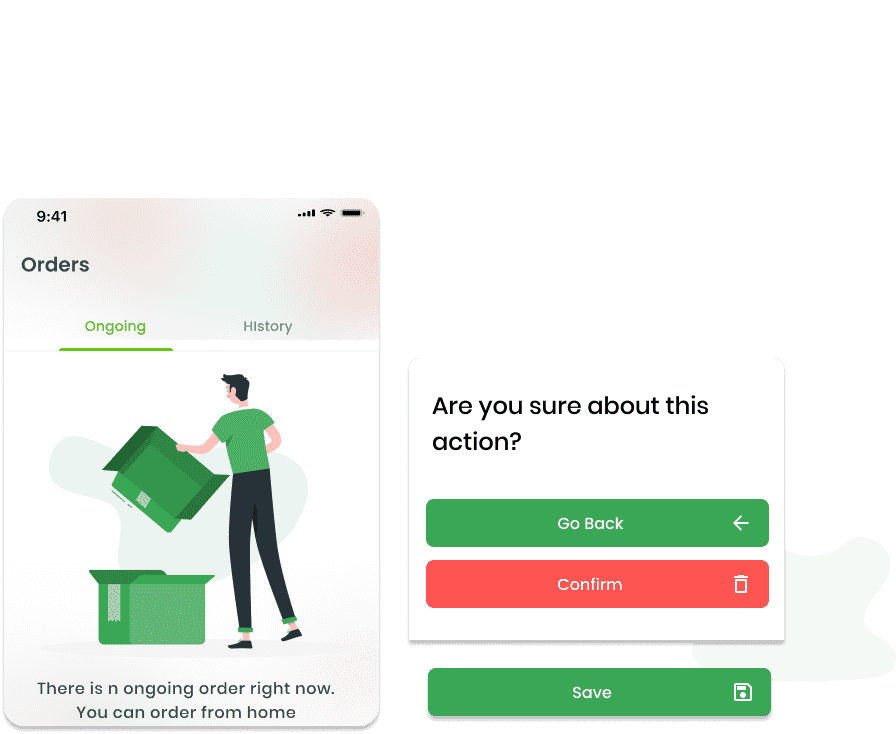
Order notifications, pickup confirmation and store settings for each grocery store on the platform.

Admin Dashboard Screens
The admin dashboard is a browser panel for your operations team. These are the areas it controls.
Profiles, orders and support history
Approval, catalogue and commission
Documents, availability and payouts
Every order and its current status
Tax rules, zones and delivery fees
Discounts by store or by platform
Sales, orders and partner performance
Push messages to customers and partners
Want to click through it yourself?
We will walk you through the customer, store, driver and admin sides on a short call.
Request a Live App DemoWhat Features Are Included in Our Grocery Delivery App?
Customer App Features
Everything a shopper needs to find products quickly and trust the delivery.
- Delivery location selection
- Product search and filtering
- Product listings and categories
- Shopping cart management
- Order placement and checkout
- Real-time order tracking
Store Owner App Features
Tools that keep each store’s catalogue accurate and its orders moving.
- Store verification
- Product and availability management
- Order management
- Order pickup management
- Multi-tax configuration
- Promo code management
Delivery Partner App Features
A simple driver app that shows the next job, the route and the pay.
- Document management
- Delivery availability control
- Instant order notifications
- Order and delivery history
- Earnings overview
Admin Dashboard Features
One control room for customers, stores, drivers, money and data.
- Customer and store management
- Delivery partner management
- Platform and order monitoring
- Tax and configuration management
- Analytics and reporting
Grocery orders are harder than restaurant orders. Baskets hold dozens of items, some sold by weight, and stock changes during the day. That is why the store app lets staff mark an item unavailable and the customer is told before the driver leaves the store.
Need a feature that is not on this list?
Tell us how your stores and drivers work and we will map the features to it.
How Does Our On-Demand Grocery Delivery App Work?
Customers Browse Products and Place Orders
The customer sets a delivery address, sees the stores that serve it, adds products to the cart and pays online or chooses cash on delivery. The order is created with its items, prices, taxes and delivery fee already calculated.
Stores Receive and Process Grocery Orders
The store gets an instant notification, accepts the order and starts picking. If an item is out of stock, staff mark it unavailable so the customer is updated and the bill is adjusted before the order is packed.
Delivery Partners Accept and Complete Deliveries
Nearby online drivers receive the request. The first to accept is routed to the store, confirms pickup, and the customer can follow the driver on a live map until the order is handed over.
Admins Manage the Entire Delivery Platform
The admin dashboard shows every live order and its status. The team can reassign a driver, resolve a complaint, issue a refund and later review sales, delivery times and partner performance in reports.
See the full order cycle in action.
We will show one order moving from the customer app to the store, the driver and the admin dashboard.
Which Grocery Delivery Business Models Can We Build?
Single-Store Grocery Delivery App
A grocery delivery app for single store businesses: one supermarket, organic shop or convenience store that wants its own branded app. Customers order only from your shelves, and you control the catalogue, prices and delivery area. It needs the customer app, a store panel and either your own drivers or a delivery partner app.
Multi-Store Grocery Delivery App
A multi-store grocery delivery app suits a chain with several outlets or dark stores. Orders are routed to the nearest outlet with the item in stock, while head office manages the shared catalogue, pricing and promotions from one dashboard. This is also the model behind quick commerce brands that promise very fast delivery from small local warehouses.
Grocery Delivery Aggregator Platform
Grocery aggregator app development creates a marketplace where many independent stores list their products and customers compare and order from them in one app. You earn a commission per order, stores manage their own listings, and the admin dashboard handles onboarding, commissions and payouts. All four apps are needed.
| Compare | Single store | Multi-store | Aggregator |
|---|---|---|---|
| Best suited to | One grocery brand or shop | Chains and dark store operators | Marketplace startups |
| Who owns the stock | You | You, across outlets | Each partner store |
| How orders are routed | To your one store | To the nearest outlet with stock | To the store the customer chose |
| Apps and panels needed | Customer app, store panel, admin | Customer app, outlet panels, driver app, admin | All four apps |
| How you earn | Product margin | Product margin | Commission and fees |
Not sure which model fits?
Share how you source stock and who delivers, and we will recommend the model and the apps it needs.
Which Add-On Features Can We Integrate Into Your Grocery Delivery App?
Real-Time Inventory Management
Sync stock with your point-of-sale or warehouse system so customers only see what is on the shelf, and suggest substitutes when an item runs out.
Advanced Product Search and Filtering
Typo-tolerant search, filters by brand, diet and price, and quick access to the products a customer buys most.
Flexible Delivery Scheduling
Delivery slots with capacity limits, express delivery and store pickup, so customers choose when and how they receive groceries.
Multiple Payment Gateway Integrations
Connect the gateways your market uses, plus wallets and cash on delivery, with refunds handled from the dashboard.
Multi-Language Support
Show the app in several languages, including right-to-left scripts, with prices in the local currency.
Advanced Analytics and Reporting
Deeper reports on basket size, repeat customers, best sellers by store and delivery performance by zone.
Personalized Shopping Experience
Reorder lists, recommendations based on past orders and reminders for items a customer buys regularly.
Loyalty and Referral Programs
Reward points, referral credit and member offers that bring customers back to your store and not a rival app.
Build only what you need today.
Pick the add-ons that matter for launch and plan the rest for later releases.
Grocery Delivery App Development for Android, iOS and Web
Android Grocery Delivery App Development
Native-quality Android apps for customers, stores and drivers, published on Google Play under your brand and tested on the budget phones many shoppers and drivers use.
iOS Grocery Delivery App Development
The same apps for iPhone, built to Apple’s guidelines and published on the App Store, with a consistent experience across both platforms.
Web-Based Grocery Delivery Platform
A browser admin dashboard for your operations team, a web store panel for partner stores and, if you need it, a web ordering site for customers.
Launch on every screen your customers use.
Android, iOS and web from one coordinated build.
What Technologies Do We Use for Grocery Delivery App Development?
Flutter and React Native for Mobile App Development
Both frameworks let one codebase power Android and iOS, so features ship to both stores together. We pick the one that suits your team and integrations.
Node.js for Backend Development
Node.js handles the many small, fast requests a grocery platform makes, such as cart updates, stock checks and order status changes.
Firebase for Real-Time App Services
Firebase powers live order status, driver location updates and push notifications, so customers, stores and drivers see changes instantly.
AWS for Cloud Infrastructure
AWS hosts the backend, database and media, and scales up for weekend and festival peaks without slowing the app.
Third-Party API and Payment Integrations
Maps and geolocation, payment gateways, SMS and email, and connections to POS or inventory systems are added as your model requires.
Security, Performance and Scalability
Role-based access, encrypted connections, secure payment handling and load testing protect the platform as order volume grows. Oyelabs is certified to ISO/IEC 27001:2022 for information security.
Have a preferred stack or existing system?
We can work with your current tools or recommend the right architecture.
How Do We Develop Your Grocery Delivery App?
Requirement Gathering and Business Analysis
We study your business model, stores, delivery area and competitors, and agree on what the first release must do.
Product Planning and Architecture
We define the apps, modules, integrations and data flow, and choose the technology stack.
UI/UX Design and Prototyping
We design clickable screens for every app in your brand style and refine them with you before coding.
App and Backend Development
We build the customer, store and driver apps, the admin dashboard and the backend in short sprints with regular demos.
Testing and Quality Assurance
We test orders end to end, on real devices, across payment, stock and delivery scenarios.
App Deployment and Launch
We publish the apps on Google Play and the App Store, set up the servers and support your launch.
Post-Launch Support and Maintenance
We fix issues, update for new OS versions and add features as your grocery business grows.
Ready to plan your first release?
Start with a requirement call and get a clear scope for your grocery app.
Explore Our Grocery Delivery App Development Portfolio

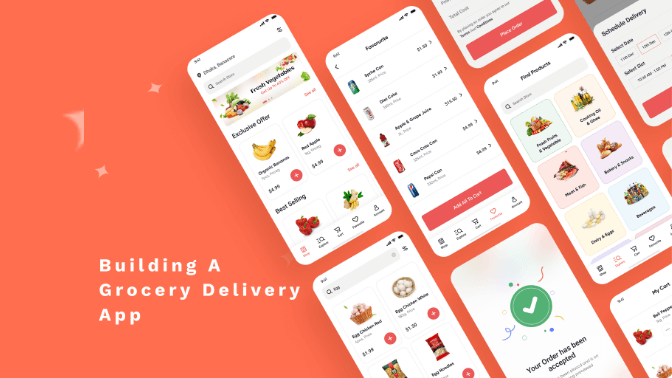
Grocella: On-Demand Grocery Delivery App
- Brief
- A supermarket app with the quickest possible ordering and suggested purchases based on past orders.
- Delivered
- Customer app, delivery driver app and admin panel on Android and iOS, with live tracking and promo codes.
- Result
- About 100,000 active users seven months after launch, according to the case study.
Grocerzz: Hyperlocal Grocery Delivery App
- Brief
- A US grocery app to compete locally with larger players, simple enough for less tech-savvy shoppers.
- Delivered
- Customer app, driver app and admin panel with delivery scheduling, one-tap reorder and shared shopping lists.
- Tech
- Java for Android, Swift for iOS, and Node.js with MySQL on the backend.
See more of our work.
Case studies across delivery, marketplace and on-demand apps.
What Do Clients Say About Working With Oyelabs?

“It's been a fantastic experience, so I would definitely rate Oyelabs a solid ten out of ten.”
Nathan J Beckles
Founder, POPTUP, United Kingdom
Watch video review
“I'm absolutely thrilled with the application you delivered. It's visually beautiful.”
Rita Pedroza
Founder, The Excursionist, United States
Watch video review
Brian shares what it was like to build Fall-in with Oyelabs.
Brian McDaniel
Founder, Fall-in, United States
Watch video reviewRead more client reviews.
Rated 4.8/5 by 100+ companies on Clutch and GoodFirms.
Why Choose Oyelabs for Grocery Delivery App Development?
Custom Grocery Delivery App Development
Built around your stores, zones and delivery rules, in your brand, with full ownership of your app and data.
Multi-Platform App Development
Android, iOS and web from one coordinated team, so every app launches together and stays in step.
Experienced Grocery App Development Team
Designers, developers and QA who have built grocery and delivery platforms before and know where they break.
Flexible Development and Engagement Models
Fixed-scope projects, dedicated teams or an interview-and-hire model, depending on how you like to work.
Feature-Rich and Scalable App Solutions
A proven core feature set, add-ons when you need them and an architecture that grows with order volume.
Post-Launch Support and Maintenance
Bug fixes, OS updates and new features after launch, from the same team that built the app.
Work with a team that has done this before.
Talk to the people who will design and build your grocery platform.
Build a Grocery Delivery App Like Leading Marketplaces
Grocery Delivery App Like Instacart
Personal shoppers pick orders from partner supermarkets, with in-app chat for substitutions.
Grocery Delivery App Like Blinkit
A grocery app like Blinkit runs quick commerce from dark stores, with a tight catalogue and very fast local delivery.
Grocery Delivery App Like Zepto
A grocery app like Zepto pairs dark store stock by zone with rider assignment built for speed.
Grocery Delivery App Like Dunzo
Hyperlocal pick-up and drop for groceries and errands from any nearby store.
Multi-Delivery App Like Glovo
One app for groceries, food, pharmacy and parcels, with a shared driver fleet.
Delivery App Like Talabat
A food and grocery marketplace with vendor storefronts and its own delivery network.
Have a marketplace in mind?
Tell us which app inspires you and we will plan your own version of the model.
Ready to Build Your Custom Grocery Delivery App?
Whether you’re launching a grocery startup, taking an existing store online or building a multi-store delivery platform, Oyelabs can help you plan a solution around your business requirements. As an on demand grocery delivery app development company, we cover strategy, design, development and launch. Share your idea with our team to discuss the features, technology and development approach.
- Free consultation with a solution expert
- NDA signed before you share details
- Clear scope and project estimate in writing
Frequently Asked Questions About Grocery Delivery App Development
What is on-demand grocery delivery app development?
On-demand grocery delivery app development is the process of designing and building the apps a business needs to sell groceries online and deliver them quickly. It usually covers a customer app, a store owner app, a delivery partner app and an admin dashboard connected by one backend.
What does a grocery delivery app development company do?
An on demand grocery delivery app development company plans, designs, builds, tests and launches your grocery platform. Oyelabs also publishes the apps on Google Play and the App Store and supports them after launch.
What applications are included in a grocery delivery platform?
A complete grocery delivery platform includes four parts: a customer app, a delivery partner app, a store owner app or panel, and a web-based admin dashboard.
What features are included in a grocery delivery app?
Core grocery delivery app features include location selection, product search and filters, categories, cart, checkout, payments, real-time order tracking, store order management, driver availability and earnings, and admin reports. Add-ons such as delivery slots and loyalty programs can be integrated.
What are the different grocery delivery business models?
The three main grocery delivery business models are single-store apps for one brand, multi-store apps for chains and dark stores, and aggregator marketplaces that list many independent stores.
Can I develop a grocery delivery app for a single store?
Yes. A single-store grocery delivery app gives one supermarket or shop its own branded app, with its own catalogue, prices and delivery area.
Can I build a multi-store grocery delivery platform?
Yes. A multi-store grocery delivery app routes each order to the nearest outlet with stock, while head office manages the catalogue and promotions centrally.
Can I develop a grocery aggregator app like Instacart?
Yes. We build custom aggregator platforms inspired by the Instacart model, where many stores list products and you earn a commission. It is your own independently developed product, not a copy of Instacart.
Can a grocery delivery app run on Android and iOS?
Yes. We build the customer, store and driver apps for both Android and iOS, usually from one Flutter or React Native codebase.
Can I manage my grocery delivery business through a web dashboard?
Yes. The admin dashboard runs in any browser and lets your team manage customers, stores, drivers, orders, taxes, promo codes and reports.
Which technologies are used for grocery app development?
Common choices are Flutter or React Native for mobile apps, Node.js for the backend, Firebase for real-time updates and AWS for hosting. The exact stack depends on your requirements.
Can I customize the grocery app with my own branding?
Yes. The apps use your name, logo, colours and app store listings, and the design follows your brand guidelines.
Can I integrate multiple payment gateways?
Yes. Multiple payment gateways, wallets and cash on delivery can be integrated as an add-on, based on the markets you serve.
Can I add new features to my grocery app after launch?
Yes. The platform is built in modules, so new features such as loyalty programs or delivery slots can be added in later releases.
Do you provide grocery app deployment and maintenance?
Yes. We publish the apps on Google Play and the App Store, set up the servers and provide maintenance and updates after launch.
Can I hire dedicated grocery app developers from Oyelabs?
Yes. You can hire dedicated grocery app developers who work as part of your team, or choose a fixed-scope project.
Explore Our Related App Development Solutions
Planning more than groceries? These services are built by the same team.
Food Delivery App Development
Restaurant ordering and delivery apps with customer, restaurant, driver and admin sides.
Ecommerce App Development
Online stores and marketplaces for any product category, on mobile and web.
On-Demand Delivery App Development
Multi-service delivery for groceries, food, pharmacy and parcels in one app.
Instacart, Blinkit, Zepto, Dunzo, Glovo and Talabat are trademarks of their respective owners and are mentioned only to describe business models. Oyelabs is not affiliated with or endorsed by them. App Store and iOS are trademarks of Apple Inc. Android, Google Play and Firebase are trademarks of Google LLC.