
Physical vs. Digital Live Shopping App: Which Should You Build?

Physical vs. Digital Live Shopping App: Which Should You Build?
 Sachin Sharma
Last Updated on August 19, 2026
Key Takeaways
What You’ll Learn:
- Physical live shopping connects livestreams with stores, staff, and existing inventory.
- Digital live shopping lets sellers stream from homes, studios, or warehouses.
- Physical apps need real-time inventory syncing with store systems.
- Digital apps need stronger audience-building because sellers lack physical store traffic.
- Physical models suit retailers, while digital models suit creators and online sellers.
Stats That Matter:
- 68% of U.S. shoppers used buy online, pick up in store in 2024.
- BOPIS usage increased from 57% in 2022 to 68% in 2024.
- Whatnot shows how digital live shopping can work without physical retail stores.
Remember when shopping meant watching someone on TV hold up a product and tell you why you needed it? Live shopping takes that same idea and puts it on your phone, but with one big difference: you can actually join in.
You can ask the host a question, see the product up close, watch other shoppers react, and buy it while the stream is still happening. It turns a simple product demo into something that feels much more like a real shopping conversation.
But if you are thinking about building a live shopping app, there is an important choice to make before you worry about features, screens, or code: Are you building around a physical store or an online-only setup?
It might sound like a small decision, but it affects almost everything behind the scenes, including how inventory is managed, how orders are fulfilled, what systems your app needs to connect with, and even which sellers will use your platform.
So, which model makes more sense for your business? Let’s break it down.
Physical vs. Digital Live Shopping: Store vs. Studio
At first glance, both models look pretty similar. You have a host, a livestream, viewers chatting in real time, and products they can buy without leaving the stream.
But behind the scenes, they work quite differently.
| What’s Different? | Physical Live Shopping | Digital Live Shopping |
|---|---|---|
| Where do you stream? | From a retail store | From a home, studio, or warehouse |
| Where is inventory? | On store shelves | In a warehouse or seller location |
| Who is it best for? | Retailers with physical stores | Online brands, creators, and independent sellers |
| Product availability | Depends on in-store stock | Based on dedicated online inventory |
| Order fulfillment | Store pickup, local delivery, or shipping | Usually packed and shipped from one location |
| Biggest advantage | Uses your existing store and inventory | More control over the shopping experience |
| The biggest challenge | Keeping in-store and online inventory synced | Building an audience without physical foot traffic |
| Useful features | Store maps, staff assistance, curbside pickup | Flash drops, countdowns, virtual try-ons, gamification |
| Best fit | Fashion, electronics, beauty, grocery, home goods | Collectibles, sneakers, resale, beauty, creator-led products |
The key difference? A physical model connects your livestream to a real store, while a digital model is built around an online-first selling operation.
From the viewer’s side, both can feel almost identical: live video, comments, product details, and a Buy Now button.
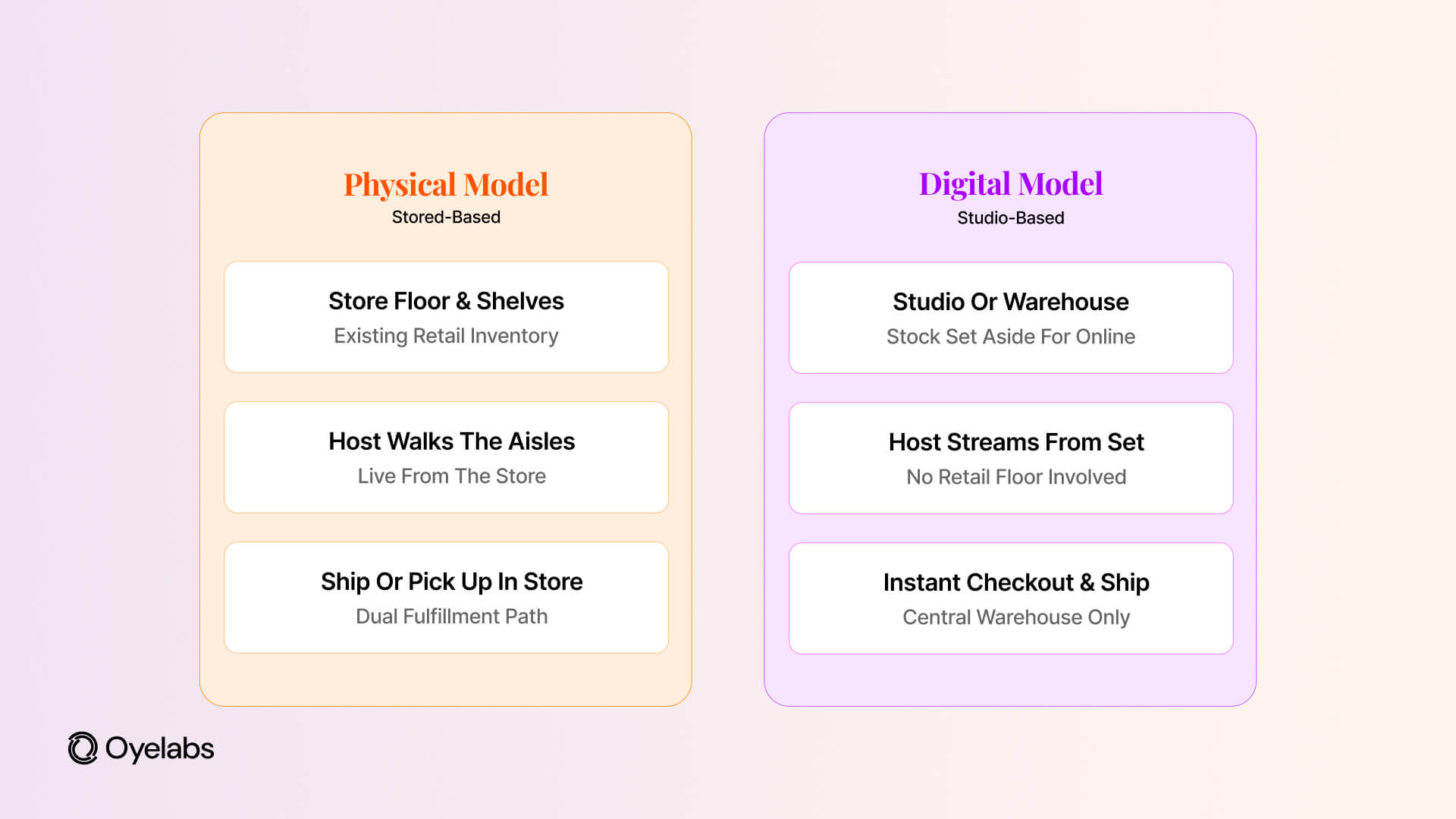
The real difference starts after that button is tapped.
Option A: Going Physical (The Store-Based App)
This model makes the most sense if you already have a store, retail staff, and products sitting on shelves.
Instead of creating a completely separate online operation, you turn the store you already have into a live shopping channel. It can work especially well for categories people already shop for in person, such as clothing, footwear, electronics, beauty, home goods, and groceries.
The Good Stuff
- It feels more real. Seeing a host walk through an actual store and pick up products from the shelf can make the shopping experience feel more authentic. For newer brands, that real-world setting can also help build trust.
- It can bring shoppers back to the store. Features such as buy online, pick up in store give viewers a reason to visit the physical location after watching a livestream. And shoppers are already comfortable with this kind of experience. According to Market Growth Reports, 68% of U.S. shoppers used buy online, pick up in store (BOPIS) at least once in 2024, up from 57% in 2022. So, someone discovering a product during a livestream can easily go from watching it online to picking it up at a nearby store.
- It helps move slow stock. Got products that have been sitting on the shelf for a little too long? A quick livestream can put them back in front of customers and give them some much-needed attention.
TalkShopLive has partnered with retailers such as Best Buy and Walmart on livestream shopping, while JCPenney has also hosted holiday livestream events. The interesting part is that these businesses already had physical retail operations. Livestreaming simply gave them another way to showcase the products they were already selling.
The Headaches
This is where the physical model gets a little tricky.
- The store can get messy. Background noise, customers walking around, inconsistent lighting, and unreliable Wi-Fi can make a live stream much harder to manage than it sounds.
- Inventory can get confusing fast. Imagine there is only one pair of shoes left. A viewer buys it during a livestream while someone inside the store picks up the same pair and takes it to the checkout.
Now you have two customers, one product, and a very awkward situation.
That is why real-time inventory syncing is one of the biggest technical priorities for this model. Your app needs to communicate with the store’s point-of-sale system so online and in-store purchases stay in sync.
Sounds simple, right? It definitely isn’t if the systems are working with different inventory numbers.
Option B: Going Digital (The Studio-Based App)
The digital model is a better fit for businesses starting from scratch, including direct-to-consumer brands, creator-led businesses, and marketplaces with independent sellers.
There is no retail store to worry about. Instead, sellers stream from home, a studio, or a warehouse while their inventory stays in one central location.
This setup works particularly well for categories such as collectibles, trading cards, sneakers, streetwear, fashion resale, and beauty products. It can also work for digital products where there is nothing to physically ship.
The Good Stuff
- You control the setup. You can plan the lighting, camera angles, audio, and background instead of hoping the store happens to look good on camera that day.
- You are not tied to store hours. A seller can stream to customers anywhere without worrying about closing time or local foot traffic.
- Shipping is more straightforward. When inventory is stored in one place, orders can be picked, packed, and shipped from the same location. Less running around, fewer chances for things to get mixed up.
Whatnot is a good example of this model. Sellers commonly stream from home setups or dedicated spaces, particularly in categories such as collectibles, sneakers, and fashion resale. There is no retail floor involved in the transaction.
For digital products, the idea can go one step further. Platforms such as Whop support products that can be delivered digitally, meaning there is no warehouse, packing station, or shipping label involved at all.
The Headaches
The biggest challenge? You have to create your own audience.
There is no physical storefront bringing in people who happen to walk past. You will probably need social media, creators, paid ads, referrals, or some combination of these to get people into your livestreams.
There is also the issue of returns. When customers cannot physically touch, try on, or inspect a product, there is a greater chance that the item does not match what they expected. That can mean more returns, especially for products where size, fit, texture, or physical appearance really matters.
Also Read: Whatnot Business Model
How Do the Features Differ?
The features you build should depend on where the shopping experience actually happens.
For a physical live shopping app, features could include a store map that shows where a product is located, a way for viewers to request help from a store employee, and local pickup or curbside pickup options.
These features make sense because the store is part of the experience. The app is basically connecting the viewer to what is happening inside the physical location.
For a digital live shopping app, you have more room to make the experience feel interactive. Think countdown timers for limited-time drops, virtual try-ons for products such as makeup or sunglasses, spin-to-win discounts, polls, and other gamified features.
Here, the app has to create the excitement that a physical store might naturally provide.
Neither approach is automatically better. The right features simply depend on how your sellers operate and what you want the shopping experience to feel like.
The Verdict: Which One Should You Build?
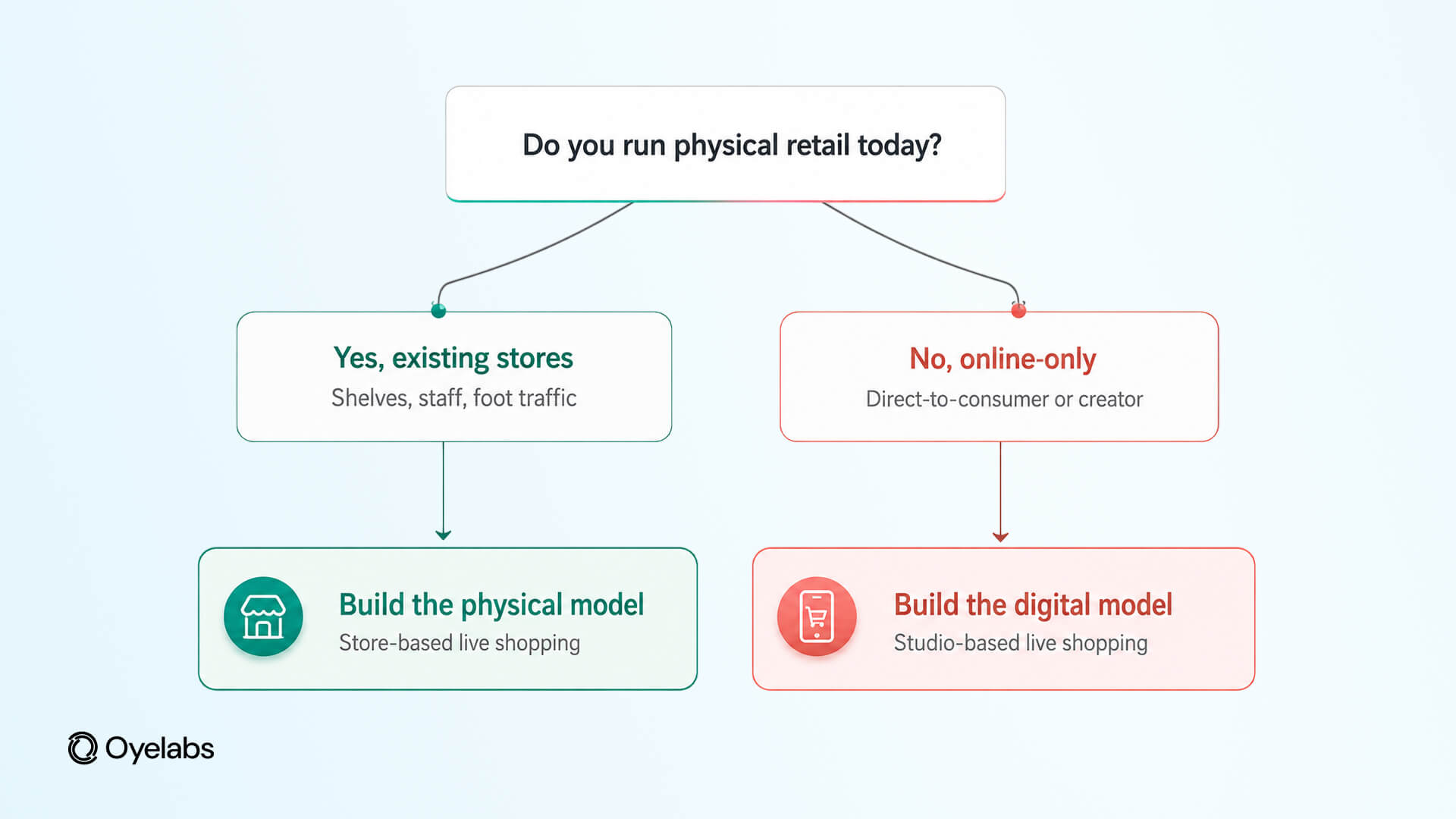
Build the physical app if you already have a retail chain, boutique, or mall-based business and want to bring your existing stores online. You already have the products, staff, and physical locations, so livestreaming becomes another way to sell what you already carry.
Build the digital app if you are starting without physical stores and want sellers to operate from home, studios, or warehouses. It gives you more freedom to sell across locations without taking on the cost of retail space.
Still not sure? Look at what you already have.
- If you have stores, staff, and existing retail inventory, the physical model is probably the more natural fit.
- If you have a warehouse, online sellers, creators, or a completely new business idea, the digital model may make more sense.
The best choice is not necessarily the one with the coolest features. It is the one that matches how your business actually works today.
Ready to Build Your Own Live Shopping App?
By now, you probably have a better idea of which model fits your business. If you already have physical stores, you can turn those shelves into a live shopping experience. If you are starting online, a digital-first model gives you more freedom to build around creators, sellers, and centralized inventory.
And you do not have to copy an existing platform exactly. You can take inspiration from successful live shopping platforms like Whatnot and build an experience around your own audience, products, and business model.
Building a Whatnot clone or your own live shopping app? Talk to the Oyelabs team about your idea. We can help you choose the right model, plan the features you need, and build a platform that fits the way your business actually works.
Conclusion
Neither model is better across the board. A physical live shopping app connects livestreaming with an existing retail operation, while a digital model gives sellers more freedom to operate online without a physical storefront.
The important thing is to decide where your products, sellers, inventory, and customers will actually be before you start building. Get that part right, and the technology becomes much easier to plan.
So, if you were launching a live shopping app today, would you build around physical stores or go fully digital?
Frequently Asked Questions
1. How much does it cost to build a live shopping app?
You can build a basic live shopping app for under $5,000 if you start with essential features and use a prebuilt solution. The final cost depends on how much you want to customize, along with features such as live streaming, payments, seller tools, analytics, and third-party integrations. A more advanced app will naturally cost more.
2. How does a live shopping app make money?
There are several ways to make money from a live shopping app. You can charge a commission on sales, offer paid seller subscriptions, charge listing fees, run ads, promote products, or offer premium tools to sellers. The right option depends on how your platform is set up and who you are selling to.
3. What features should a live shopping app have?
Start with the features that make live shopping actually work: live video, real-time chat, product tagging, in-stream checkout, payments, user accounts, order management, and notifications. If you are building a marketplace, you will also need seller profiles, seller onboarding, commission management, moderation, and an admin panel.
4. Can I build a live shopping app for multiple sellers?
Absolutely. A multi-vendor live shopping app can let different sellers and creators host their own streams, showcase products, interact with viewers, and manage their orders. On the other side, the platform owner can manage sellers, commissions, payments, content, and other marketplace activity from one admin panel.
5. How is a live shopping app different from a regular ecommerce app?
A regular ecommerce app is mainly about browsing products, checking details, and placing an order. A live shopping app adds the human part. Customers can watch a host demonstrate a product, ask questions, interact with other viewers, and buy while the stream is still happening. It feels less like scrolling through a catalog and more like shopping with someone in real time.
Reviewed By: Sachin Sharma
Sr. Digital Transformation Consultant, Oyelabs