How to Launch Your Delivery App Without Writing a Single Code
How to Launch Your Delivery App Without Writing a Single Code
 Anuraag Jain
Last Updated on November 17, 2026
Key Takeaways
What You Will Learn
* The three realistic ways to launch a delivery app without coding, and which one fits your stage.
* How to test demand in two weeks with a landing page, forms, and manual delivery.
* Where no-code builders work well, and where they struggle with delivery.
* What a ready-made white-label platform gives you, and what you still have to do yourself.
* The Apple App Store rule on templates and app generation services that many founders miss.
* How to choose your route in five steps.
Real Insights
* Apple’s guidelines say apps created from a commercialized template or app generation service are rejected unless submitted directly by the provider of the app’s content.
* Adalo’s free plan cannot publish to the App Store or Google Play, so a real launch needs a paid plan.
* WhatsApp’s business platform has charged per message since July 1, 2025, with free replies inside a 24-hour customer window.
* No-code is a strong way to test demand. A multi-party delivery marketplace usually needs more than a stitched-together stack.
Yes, you can launch a delivery app without coding, and you do not need a technical co-founder to do it. What you do need is the right route for your stage, because testing an idea and running a real delivery business are two different jobs. This guide shows how founders launch a delivery app without coding, and where each approach starts to break.
At OyeLabs, we build delivery platforms for founders who have never written a line of code. Some arrive with a validated idea, and others arrive with a 2 am idea and no proof. Our advice to both groups is the same: test demand cheaply first, then launch on a proven base, such as our ready-made UberEats clone platform, when the numbers justify it.
The three routes below are concierge testing, no-code app builders, and a ready-made white-label platform. We cover what each costs you in time and risk, and how to pick one.
Quick Answer
You can launch a delivery app without coding in three ways. A concierge MVP uses a landing page, forms, and manual delivery to test demand in days. A no-code builder such as Glide or Adalo suits simple ordering apps. A ready-made white-label platform gives you customer, restaurant, delivery partner, and admin apps without building anything. Start with the first, and move to the third when demand is proven.
What Without Coding Really Means
Without coding does not mean without work. You will not write software, but you still own the decisions: which cuisines or products, which neighbourhoods, how drivers are paid, how refunds work, and how customers find you. No tool removes those.
It also helps to know what a delivery app has to do. A single order touches four surfaces: the customer app, the merchant’s order screen, the driver app, and an admin panel. Behind them sit live tracking, payments with payouts, maps, and notifications that must all agree in real time.
That is why a delivery marketplace is harder than a simple booking app. In our assessment, a stitched-together no-code stack works well for the first test and gets fragile when orders, drivers, and refunds run in parallel.
Route 1: Test Demand With a Concierge MVP
A concierge MVP means you deliver the service by hand while customers use a simple front end. You are not building an app yet. You are finding out whether people will order, pay, and order again.
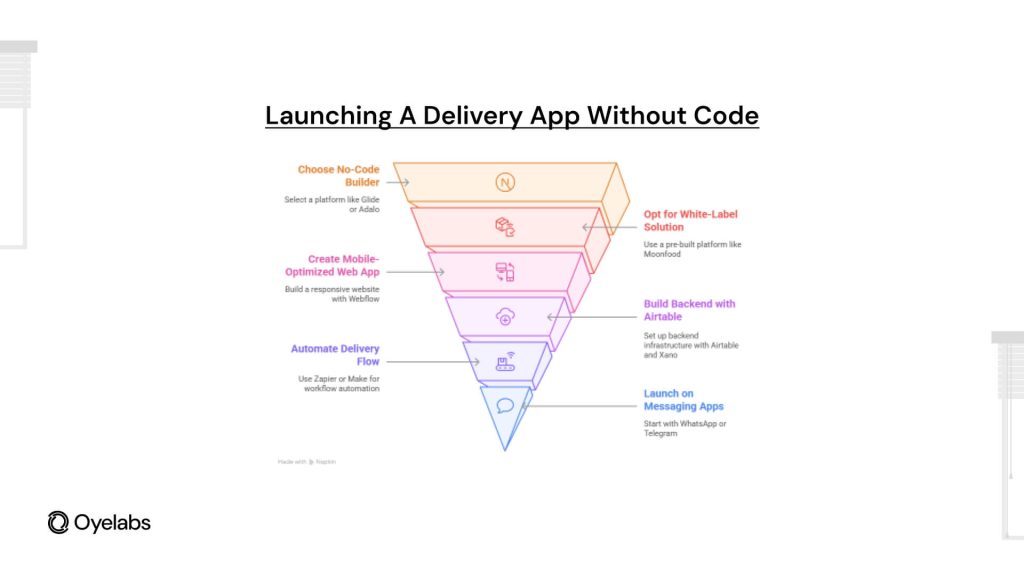
A landing page on a tool like Carrd or Webflow collects interest. A form from Typeform or a simple order page captures requests. Airtable or Google Sheets tracks orders. Zapier or Make connects them, and Zapier says it connects 9,000 apps, so alerts, confirmations, and driver messages can run without code.
Messaging apps are another fast option, especially for hyperlocal markets. Meta’s WhatsApp Business Platform pricing documentation says it has charged per message since July 1, 2025. A customer message opens a 24-hour window in which your non-template replies are free, while marketing templates are always billed. Check current rates and rules for your country before you rely on it.
| Week | What you do | What you measure |
|---|---|---|
| Week 1 | Build a landing page and a simple order form, then drive local traffic to it | Visitors, signups, and cost per signup |
| Week 2 | Take real orders by form or chat, buy or prepare the goods, and deliver them yourself | Orders, repeat orders, delivery time, and cost per order |
| Decision | Compare results with a pass mark you set before you started | Whether demand and margins justify a real app |
Our suggested test plan. Set your own pass mark in advance, because it is easy to talk yourself into a weak result.
Tip: Decide what success looks like before the test starts, such as a number of repeat orders from the same customers. Founders who set the target afterwards almost always find a reason to continue.
Route 2: Build With a No-Code App Builder
No-code builders let you assemble an app from a database or spreadsheet without writing code. Glide builds apps from spreadsheets and database tables, while Adalo offers more visual design control and relational data. Both can be a good fit for a simple, single-vendor ordering app, a courier request form, or an internal operations tool.
Check the limits first. Adalo’s pricing page shows that its free plan allows 500 records per app and cannot publish to the App Store or Google Play, so a real store launch needs a paid plan. Prices and limits change, so review the current plans before you decide.
The bigger limit is delivery itself. A marketplace needs separate customer, merchant, and driver experiences, real-time tracking, payout logic, and an admin panel that can handle disputes. You can approximate these with tools like Airtable as the database and Zapier for automation, but every link is another subscription and another point of failure.
There is a cost to scale as well. No-code plans often charge by records, users, or workflow runs, so a successful launch can raise your bill. That is not a reason to avoid them, but it is a reason to treat a no-code app as a test, not a long-term foundation for a delivery business.
Warning: The Apple App Review Guidelines say apps created from a commercialized template or app generation service will be rejected unless they are submitted directly by the provider of the app content. Whatever route you choose, publish under your own developer account and check how your builder handles submission.
Route 3: Launch on a Ready-Made White-Label Platform
When demand is proven, a ready-made platform is the shortest route to a production app. Our UberEats clone gives you four connected parts: a customer app, a restaurant dashboard, a delivery partner app, and an admin panel. It includes live order tracking, reordering, multiple delivery addresses, multi-branch restaurant management, and map-based zone setup.
You do not write or review code. We deploy the base, apply your branding, configure your zones, fees, and payment gateway, and prepare your store listings, while you supply your requirements, brand assets, and accounts. Add-ons such as AI recommendations, route optimisation, and extra languages can be added when you need them.
For a ready-made base with light customisation, our plan runs about 10 working days from the point we receive your technical requirements. Fully custom platforms follow a scope-based timeline. If you are weighing both, our guide to custom versus pre-built delivery solutions explains the trade-offs.
Which Route Should You Choose?
| Route | Best for | Speed | Main limit |
|---|---|---|---|
| Concierge MVP | Testing demand before you spend | Days | Manual work does not scale past a few orders a day |
| No-code builder | A simple single-vendor ordering app | Days to weeks | Struggles with driver dispatch, tracking, and payouts |
| Ready-made platform | Launching a real delivery business | About 10 working days with light customisation | You must still differentiate and generate demand |
| Custom build | Unique logic no base provides | Longest, depends on scope | Highest cost and risk before demand is proven |
Our assessment. Timelines depend on scope, approvals, and how quickly you make decisions.
Why a Ready-Made Platform Beats Building From Scratch
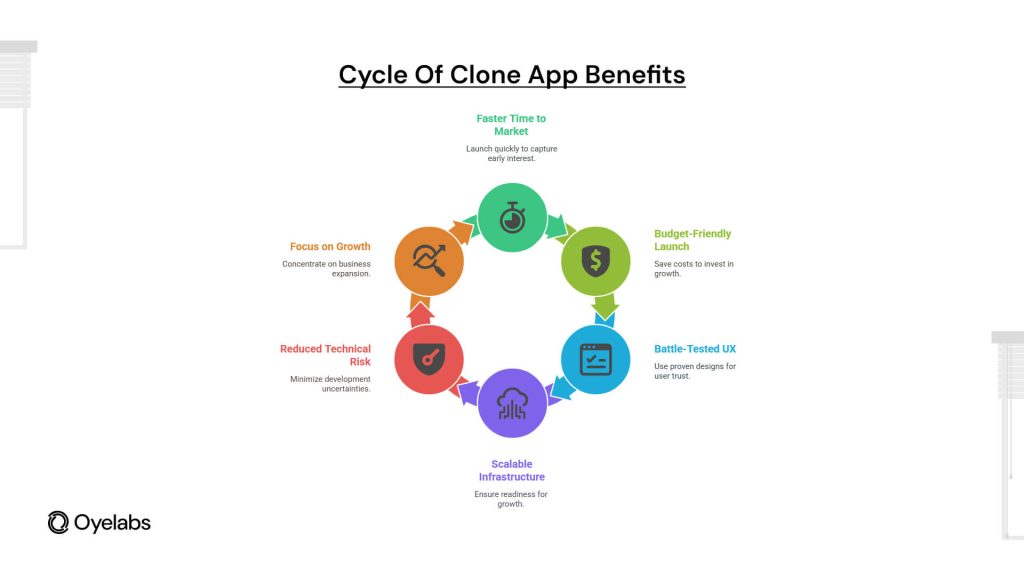
Faster time to market
A ready-made base lets you launch in weeks, not after a long build. That speed matters because the fastest way to learn whether your idea works is to put it in front of real customers and watch what they do.
A smaller upfront bill
Building a delivery platform from scratch means paying for backend, apps, design, testing, and iteration before you have a single customer. A ready-made base turns most of that into a fixed starting point, so more of your budget can go to restaurants, drivers, and marketing. Costs vary with customisation, hosting, and add-ons, so ask for a written quote that lists what is included.
Familiar workflows
Customers already know how food delivery apps behave, so a familiar flow lowers the learning curve. Your job is then to differentiate through your niche, your brand, and your service, not to reinvent checkout.
Lower technical risk
A tested base has already handled real orders, payments, and notifications, so fewer surprises reach your launch. You also avoid depending on one freelancer who may become unavailable mid-project.
More time for growth
When the platform is handled, your time goes to the work that decides whether you win: signing restaurants, recruiting riders, running local promotions, and listening to customers.
Reality Check: A ready-made platform is not a shortcut around differentiation. Apple also tells developers not to copy a popular app or make minor changes to the name or UI of another app and pass it off as their own. Give your app its own brand, niche, and offer.
Case Study: How Kwiki Launched in Mexico
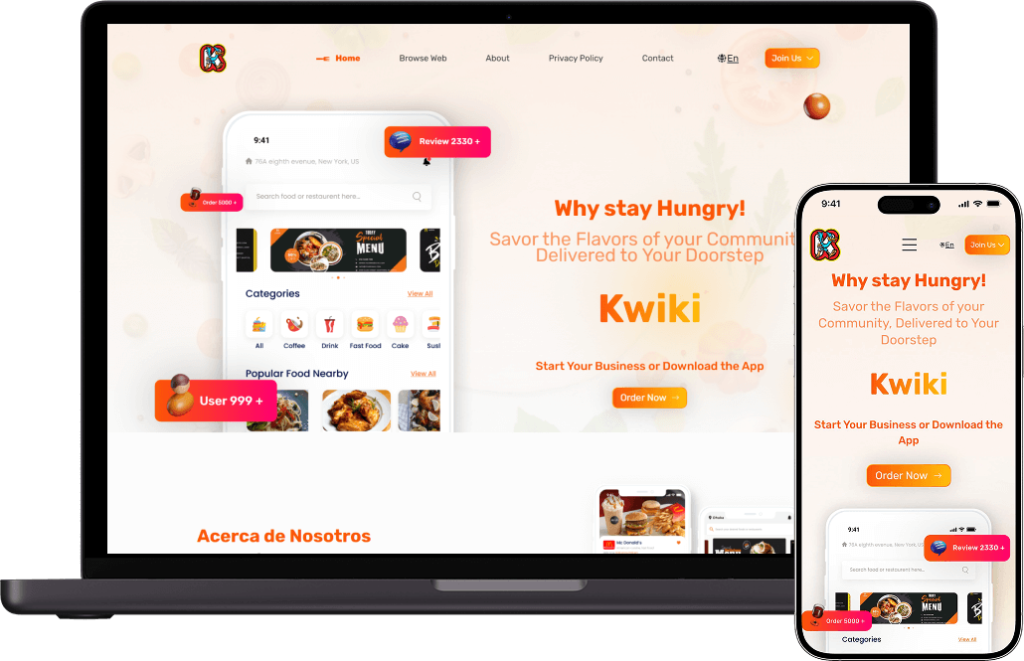
Kwiki is a food delivery startup in Mexico, started by a first-time founder with no in-house development team. The goal was to launch an UberEats-style service quickly and affordably, to test product-market fit, with Spanish-language support and operations suited to Mexican delivery.
We deployed our UberEats clone architecture and delivered a branded landing page, a web ordering app, Android and iOS customer apps, restaurant apps, a delivery agent app, a restaurant panel, and an owner dashboard. Spanish was built in at the system level, and zone-based ordering defined where the service ran. According to the case study, the platform went live within a week, and the client later took an annual maintenance plan.
How to Choose Your Route in Five Steps
- Write your model in one sentence. Who orders, what they order, who delivers, and how you make money.
- Run a two-week concierge test. Use a landing page, a form, and manual delivery to collect real orders.
- Check the numbers against your pass mark. Look at repeat orders and the margin per order, not just signups.
- Pick the route that matches your stage. A simple niche may stay on no-code, while a multi-restaurant business needs a platform.
- Prepare your accounts early. Payment gateway, Apple and Google developer accounts, and legal documents can take longer than the build.
Common Mistakes When Launching Without Coding
Building before testing. Founders who skip validation often build features for customers who do not exist. A two-week test costs far less than a wrong app.
Ignoring operations. A delivery app is an operations business. Drivers, restaurant onboarding, support, and refunds decide whether customers come back, and no platform handles them for you.
Launching a template with no angle. Without a niche, a clear brand, and a reason to choose you, a new app competes head on with giants. Pick a neighbourhood, a cuisine, or a customer group and serve it better.
Forgetting store rules. Publish under your own developer account, give the app its own identity, and test it before submission, since Apple rejects apps it considers templates or copies.
Next Step: Tell us your idea, your city, and what you have tested so far, and we will tell you honestly whether to keep testing or launch, and what the fastest route looks like.
Conclusion
You can launch a delivery app without coding, but the smart path is to test before you build. Run a short concierge test, use no-code only where it fits, and move to a ready-made platform when your orders prove the idea.
The founders who win are the ones who treat the app as the easy part and operations as the real work. When you are ready to launch, the contact form below is the quickest way to get a plan, a timeline, and a quote.
Frequently Asked Questions
Can you really launch a delivery app without coding?
Yes. You can test demand with a landing page, forms, and manual delivery, build a simple app with a no-code builder, or launch on a ready-made white-label platform that we configure and brand for you. None of these requires you to write code.
What is the best no-code platform for a delivery app?
It depends on the app. Glide suits simple apps built from spreadsheets, and Adalo offers more visual control and publishes to the App Store and Google Play on paid plans. For a multi-restaurant marketplace with drivers and tracking, a ready-made platform is usually a better fit.
Can I publish a no-code or template app to the App Store?
Yes, but you must follow Apple’s rules. Apple says apps created from a commercialized template or app generation service are rejected unless submitted directly by the provider of the app’s content, so publish under your own developer account and give the app its own identity.
How long does it take to launch a delivery app without coding?
A concierge test can run in days. A no-code app can take days to weeks depending on complexity. On our ready-made base with light customisation, our plan runs about 10 working days from the point we receive your technical requirements.
How much does it cost to launch a delivery app without coding?
It depends on the route. Concierge tests cost mainly your time and small tool subscriptions. No-code builders charge monthly plans that rise with usage. A ready-made platform is a one-time purchase plus customisation, hosting, and add-ons, so we send a written quote listing what is included.
Is a no-code app or a white-label app better?
Use no-code to test an idea or run a simple single-vendor app. Use a white-label platform when you are ready to operate a real delivery business with customer, restaurant, and driver apps and an admin panel.
Can I start on WhatsApp and move to an app later?
Yes, and it is a sound way to validate a hyperlocal idea. Customers and orders you collect on WhatsApp can move to your own app once demand is proven. Check WhatsApp’s current pricing and business rules for your market first.
Sources and Editorial Notes
Sources
- Apple Developer: App Review Guidelines (sections 4.1, 4.2, and 4.2.6)
- Adalo: Pricing
- Zapier: Platform
- Meta for Developers: Pricing on the WhatsApp Business Platform
Editorial Notes
- Last updated November 17, 2026. This post was originally published on December 22, 2025.
- Tool plans, limits, and prices change often. Adalo’s free plan terms are as shown on its pricing page when we checked, and Zapier’s app count is as it states.
- WhatsApp pricing and policy details are as stated in Meta’s documentation and vary by country and message type.
- The test plan, the route comparison, and the five-step process are OyeLabs guidance based on how founders typically launch, not guarantees.
- The Kwiki details are from the OyeLabs case study. Our launch timeline is planning guidance, and scope and price are confirmed in a written quote.
- Glide, Adalo, Zapier, Make, WhatsApp, Uber, and other brands are referenced only to describe tools and the market, and OyeLabs has no affiliation with them.