
Workana Clone
Move from idea to live freelance marketplace in 7 days
Workana clone gives founders a structured way to build a freelance marketplace without delays. Pre-developed with modular code, secure integrations, and a scalable backend, it adapts easily to your business goals. You can launch a complete platform in just 7 days, with every feature fully customizable to your requirements. Plus, we provide 2 months of free post-launch support, ensuring your marketplace runs smoothly while you concentrate on building user trust and growth.
Latest Version 4.0.0
Guaranteed Live Within 1 Week *Terms & Conditions Apply
Here’s What You Get:






Workana Clone Script – Best White-Label Freelance Marketplace Solution
A freelance marketplace app empowers founders to create value by connecting skilled professionals with businesses in need, unlocking steady revenue and long-term growth opportunities. It removes barriers like hiring costs, location limits, and inefficient workflows, giving startups a proven model to scale fast.
Choosing our Workana clone script means building on a white-label platform engineered with modular code, secure APIs, and scalable infrastructure. Designed for flexibility, it adapts to your unique business vision while ensuring stability and performance. With a focus on founders, we deliver a dependable solution built for real-world marketplace challenges.
Go Live in Under a Week
All Devices, One Launch - Web, iOS, and Android
60 Days of Expert Help, No Extra Cost
Customize Everything - Restriction Free

Workana Clone Script
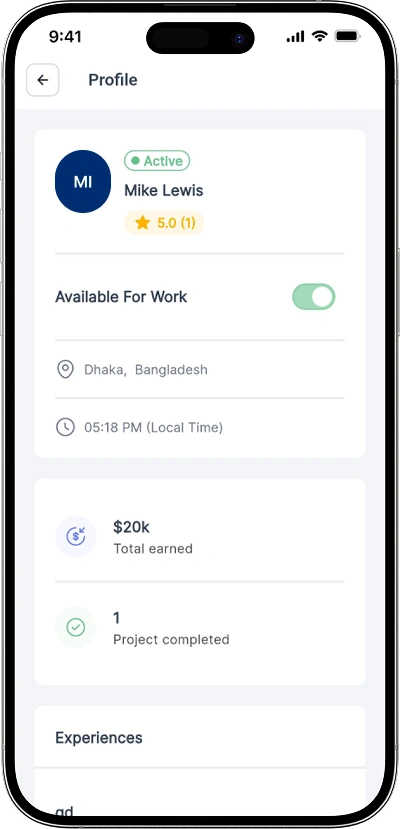
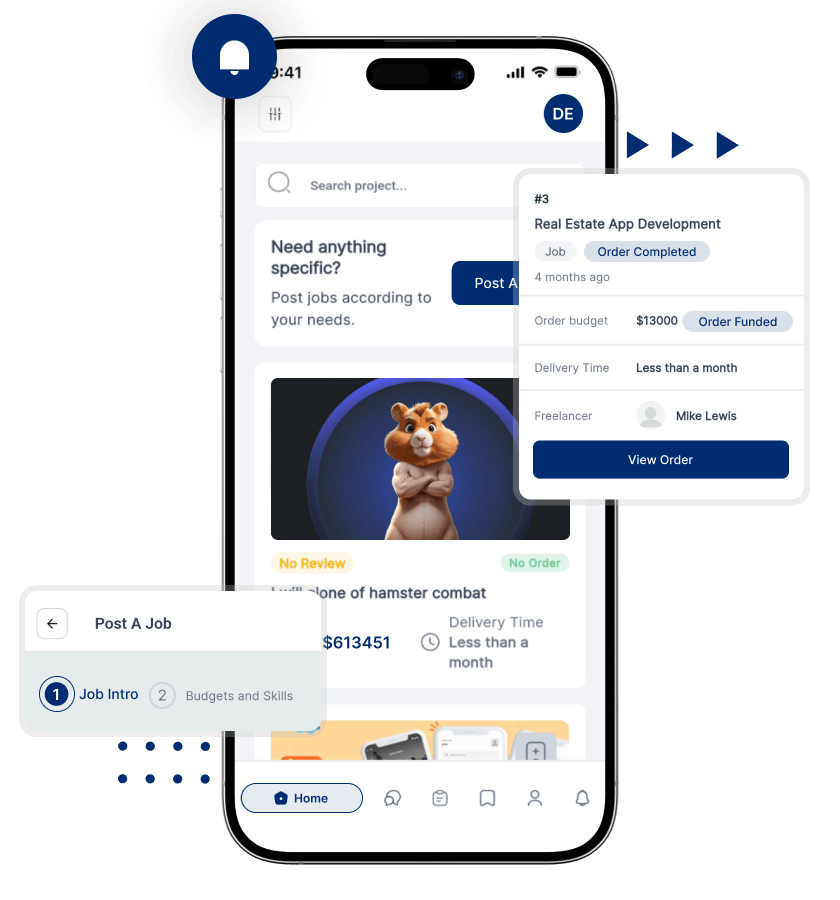
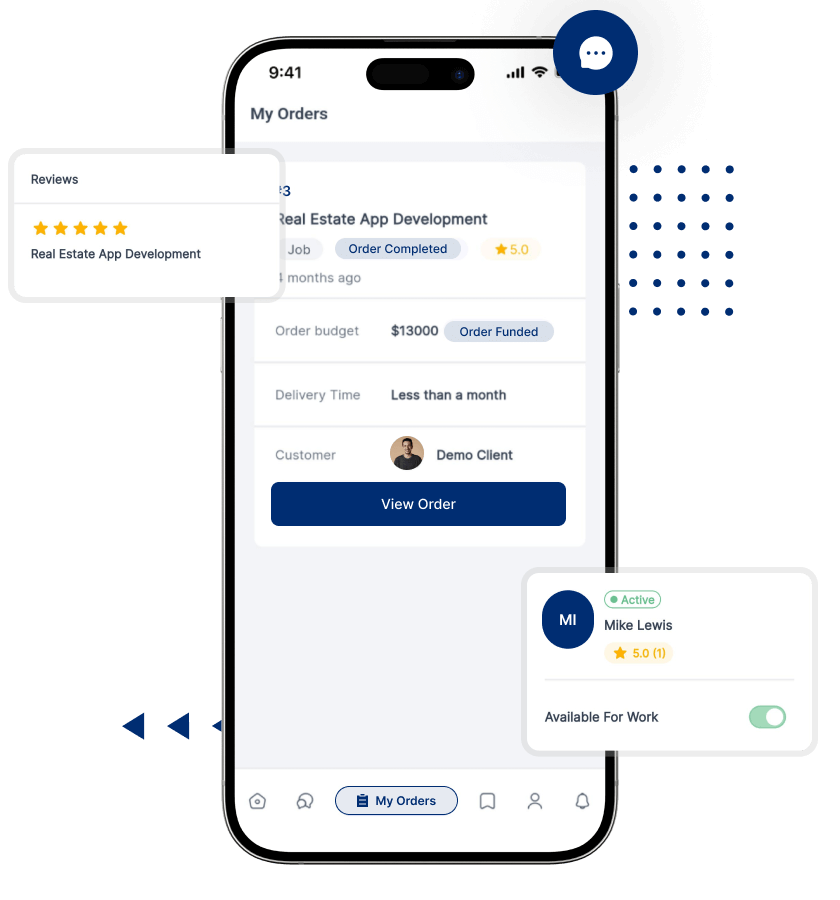
Snaps Of Our Workana Clone App
Discover a world of possibilities through our app screen gallery! Explore the sleek design and seamless functionality of our Workana clone app.



View Demo
Explore the Live Product Demo of Our Workana Clone App to See How it Actually Works
Trusted by Successful Entrepreneurs









Features You Get With Our Workana Clone
Features for Freelancers
Profile Setup
Skill Showcase
Job Alerts
Proposal Submission
Project Dashboard

Features for Clients
Easy Registration
Project Posting
Budget Setting
Proposal Review
Hire Freelancers
Features for Admin
User Managment
Project Monitoring
Payment Control
Report Analytics
Role Assignment
Explore More Features of Our Workana Clone
Freelancer App Features
Real-Time Chat
Freelancers can communicate instantly with clients, making discussions about project updates, timelines, and requirements quick, clear, and more efficient.
File Sharing
Secure file-sharing allows freelancers to upload proposals, deliverables, and project assets directly, keeping collaboration organized within the platform.
Payment Tracking
Freelancers can track payments in real time, ensuring transparency, avoiding confusion, and building financial trust with every completed project.
Milestone Creation
Freelancers create milestones to divide projects into smaller parts, helping ensure clarity, timely payments, and structured delivery for every task.
Secure Wallet
A built-in digital wallet keeps freelancer earnings safe, allowing quick withdrawals and secure money management directly within the app.
Feedback System
Freelancers receive reviews and ratings from clients, helping build credibility, improve profiles, and attract more projects with higher trust.
Task Management
Organized task boards help freelancers manage deadlines, monitor progress, and keep work structured without losing track of important deliverables.
Work History
Freelancers can display completed projects, showing reliability and experience to attract new clients looking for proven professionals.
Bid Management
Freelancers track active bids, update offers, and manage proposal statuses, giving them better control over project opportunities.
Invoice Generator
This feature lets freelancers create professional invoices instantly, ensuring smooth transactions and financial clarity with clients.
Earnings Report
Detailed earnings reports provide freelancers with clear insights into income, completed projects, and financial growth over time.
Client App Features
File Exchange
Clients securely exchange documents, designs, and instructions with freelancers through the app, ensuring accurate requirements and eliminating external communication dependencies.
Payment Escrow
Funds are held safely in escrow until freelancers deliver milestones, protecting client budgets and ensuring reliable, trust-driven financial transactions.
Milestone Setup
Clients create milestones for projects, breaking work into manageable parts, ensuring structured payments, accountability, and steady progress toward completion.
Invoice Management
Clients manage invoices in one place, reviewing, approving, and downloading them for organized payment tracking and streamlined financial reporting.
Job History
Clients view past projects, including hired freelancers, budgets, and results, helping them make smarter hiring choices and rehire trusted professionals.
Feedback Ratings
Clients provide reviews and star ratings for freelancers, promoting accountability, encouraging better service, and guiding future hiring decisions within the platform.
Favorite Freelancers
Clients can save and favorite freelancers they like, making it easier to reconnect for repeat work without long searches.
Project Dashboard
A client dashboard organizes active projects, budgets, deadlines, and communication threads, helping maintain control and visibility over the entire workflow.
Transaction Report
Clients receive detailed transaction summaries, tracking project-related expenses, escrow activity, and payments, supporting better financial management and clear accountability.
Custom Contracts
Clients draft custom contracts with unique terms and deliverables, ensuring projects align with specific needs while protecting both parties legally.
Quick Rehire
Clients instantly rehire trusted freelancers from past projects, saving time, reducing risk, and ensuring smoother collaboration with reliable professionals.
Admin Panel Features
Escrow Control
Admins manage escrow funds, releasing payments only when milestones are verified, ensuring fairness, financial transparency, and trust for all marketplace participants.
Content Moderation
Admins review and moderate platform content, including listings, messages, and user profiles, ensuring compliance, professionalism, and a safe working environment.
Fee Management
Admins set commissions, manage platform service charges, and adjust fees, ensuring a sustainable revenue model without disrupting client or freelancer experience.
Dispute Handling
Admins resolve disputes between freelancers and clients by reviewing evidence, ensuring fair solutions, and maintaining trust in the platform’s credibility.
Security Settings
Admins configure advanced security settings, protect sensitive data, and monitor suspicious activity, reducing risks and safeguarding the platform’s reputation.
Transaction Logs
Admins access complete transaction histories, monitoring payments, disputes, and withdrawals, supporting compliance, transparency, and efficient financial audits.
Dashboard Insights
Admins access powerful dashboards with analytics on user growth, active projects, and revenue trends, helping guide smart business decisions effectively.
Commission Setup
Admins configure flexible commission rates across services or user types, aligning the platform’s earning model with growth goals and market needs.
Notification Control
Admins manage notifications for clients and freelancers, ensuring timely updates without spamming users, keeping communication effective and professional.
Data Backup
Automatic data backup ensures platform information remains safe, enabling recovery during outages or errors, keeping marketplace operations uninterrupted.
System Updates
Admins apply timely updates to improve security, fix bugs, and add new features, ensuring platform performance remains reliable and future-ready.
People Love Us! Let’s Hear What they Say



Add-On Features We Offer for the Workana Clone App
Multiple Payment Options
Clients and freelancers can pay or receive money using different payment methods, making transactions easier, faster, and more convenient for everyone.
Multi-Currency Support
Supports payments in various currencies, enabling clients to work with global freelancers smoothly without worrying about conversion issues or extra charges.
Language Options
Users can navigate the platform in multiple languages, improving accessibility, engagement, and usability for clients and freelancers worldwide.
Third-Party Integrations
Seamlessly connect with external tools like accounting, communication, or project management apps, enhancing workflow efficiency and saving time for clients.
Dispute Support
Provides structured support to resolve conflicts between clients and freelancers fairly, ensuring trust, safety, and smooth platform operations.
Profile Badges
Freelancers earn badges to highlight skills, achievements, or reliability, helping clients identify top talent quickly and make confident hiring decisions.
API Integrations
Clients can integrate their existing software with the platform using APIs, streamlining operations, automating tasks, and improving productivity efficiently.
KYC Verification
Ensures freelancers and clients are verified through secure identity checks, building trust, preventing fraud, and creating a safer marketplace environment.
Paid AI Add-Ons for the Modern Age Workana Clone
AI Proposal Generator
Automatically creates professional, well-structured project proposals for freelancers, saving time, improving quality, and increasing chances of winning client projects effectively.
Smart Project Matching
AI recommends the best freelancers for client projects based on skills, experience, and past performance, ensuring faster, accurate, and efficient hiring decisions.
AI Skill Assessment
Evaluates freelancer skills through intelligent tests and analysis, helping clients choose the most qualified professionals confidently for each project requirement.
Automated Invoice Creation
Generates accurate, professional invoices instantly for completed milestones, saving freelancers time while ensuring clients receive clear, organized payment documents efficiently.
Predictive Earnings Analytics
AI analyzes trends and predicts future freelancer earnings, helping clients and freelancers plan budgets, optimize rates, and make informed business decisions.
AI Chat Assistant
Provides instant AI-powered support within the platform, answering queries, guiding tasks, and improving communication between clients and freelancers seamlessly.
Our Workana Clone is for Multiple Platforms

Web

iOS

Android
Client’s Reviews

Steve Topley, CEO
“Our Workana clone solution exceeded expectations. The platform’s stability, scalability, and seamless freelancer-client workflow allowed us to launch quickly while maintaining high operational efficiency across teams.”

Tiffany Jones, COO
“The Workana clone delivered remarkable flexibility and control. Its robust features and intuitive interface enabled our organization to manage projects and payments effortlessly, enhancing overall productivity significantly.”

James Collingwood, CMO
“From deployment to post-launch support, the freelance marketplace offered reliable performance and customization. The team’s technical expertise ensured a smooth launch, positively impacting our project management processes.”
Technologies Used In Our Workana Clone Script

Workana Clone Development Process We Follow at Oyelabs

Requirement Gathering

White Labelling

Feature Addition

Testing

Deployment

Support & Maintenance
How Does Our Workana Clone Work?

User Registration

Profile Creation

Project Posting

Proposal Submission

Project Management

Payment Release
What Makes Our Freelance Marketplace Platform the Best

Effortless Flow

Instant Access

Market Ready

Secure Platform
Online Freelancing Market – Statistics, Growth, and Trends
The freelance platforms industry is experiencing rapid expansion, with demand for flexible work solutions increasing worldwide. Experts forecast the global freelance platforms market will reach approximately USD 14.39 billion by 2030, reflecting significant growth opportunities for digital marketplaces.
As more businesses and professionals embrace remote collaborations, the potential for new freelance platforms continues to rise, making it a highly lucrative venture for founders. Launching a freelance marketplace app today can generate substantial revenue while meeting evolving market needs. Secure your competitive advantage by choosing our Workana clone for a ready-to-launch, customizable solution.

Why Choose Oyelabs for Your Workana Clone?
- Expert Support: Our experienced team provides continuous help during development and after launch, resolving issues or bugs to ensure your freelance marketplace runs reliably.
- Full Ownership: With fully licensed source code, you control every aspect of your app. Customize features, scale operations, and manage updates without restrictions.
- Strong Security: Advanced security safeguards user profiles, project details, and in-app payments, keeping your freelance marketplace safe, trustworthy, and compliant with industry standards.
- Transparent Process: We maintain clear communication at every step, sharing development updates, feature progress, and strategies to ensure smooth collaboration and complete trust.
- Client-Focused Approach: Every feature and customization is designed to match your business goals, helping your Workana clone succeed in the competitive freelance marketplace.
- On-Time Delivery: Following a structured timeline, we launch your Workana clone on the web, iOS, and Android efficiently, ensuring a smooth and timely rollout.
- Strict Confidentiality: All business strategies, operational data, and user information are fully protected. Our strict privacy standards keep your Workana clone secure and proprietary.
Life at Oyelabs
At Oyelabs, we focus on creating innovative and impactful solutions. Our team is diverse, passionate, and driven by a shared commitment to excellence. We work collaboratively, supporting each other to achieve our goals and grow both personally and professionally. Our culture encourages creativity and learning, making Oyelabs a place where ideas thrive. We believe in maintaining a healthy work-life balance, ensuring everyone feels valued and motivated.
- Healthy Work-Life Balance
- Encourage Creativity and Learning
- Commitment to Excellence
- Career Growth Opportunities
- Continuous Learning and Development


ISO Certified – OyeLabs
OyeLabs is an ISO Certified company driven by a commitment to quality, performance, and security. Our development processes align with international standards to deliver dependable and future-ready digital solutions.
Unleash Your Business’s True Potential,
With Our Workana Clone App- Starting at $5999 $2999
Other On-Demand Solutions
Explore Oyelabs’ Ready-Made Solutions for Effortless Work in Different Industries.
Oyelabs presents a suite of ready-made solutions designed for seamless work across diverse industries. Our user-friendly products ensure efficiency and ease, making your tasks hassle-free.
Making a Difference Beyond Business.
As a people-centric organization, our success is intervened with the well being and growth of the Individuals we collaborate with. We thrive when our partners associates flourishes.

Release Log
Version: 4.0.0
-
Release Date: November 28th, 2024
- Flexible profile management: users can switch between Freelancer and Client roles, with admins able to restrict switching from Additional Settings.
- Configurable project/job duration and experience levels in the admin panel, with fallback to default values if no custom settings are provided.
- Control over file uploads: manage allowed extensions and maximum size directly from admin settings.
- Frontend reviews now support smooth pagination without reloading the page.
- Admin panel upgrades:
- Bulk deletion for Freelancers and Clients.
- Option to email either all registered users or only subscribers (separate menus).
- Text search added across projects, jobs, and related categories/subcategories.
- Mobile app notifications extended to include file upload alerts (Notification menu).
- Improved chat readability with better word wrapping.
- Layout fix: even box sizes in Xilancer project views.
- General stability updates and performance refinements.
New Features & Enhancements:
Version: 3.9.0
-
Release Date: October 18th, 2024
- Clients can post jobs on an hourly basis with rate and time management.
- Wallet verification is required before creating hourly orders.
- Freelancers can:
- Verify payment before accepting work.
- Use a time tracker with notes and restore progress if interrupted.
- View personal work history.
- Clients gain visibility into freelancer work logs and can adjust tracked time.
- Real-time earnings display for both sides.
- Full admin control: view, activate/deactivate, and manage hourly jobs, including minimum hours setup.
- Fixed image upload issues on cloud servers.
- Images now render properly on profile details.
- Translation inconsistencies corrected.
- Introduced an add-on for freelancer profile promotion.
- Updated translation strings for project duration.
- Minor bug corrections and style adjustments.
HourlyJob Plugin (Premium):
Version: 3.8.0
- Enhanced validation for blog categories and user names during registration.
- Option to enable/disable reCAPTCHA for registration.
- Meta title/description fields added to projects and jobs.
- New add-ons: promote projects, view all projects, and latest projects button.
- Expanded file support: Docx and Zip in chat, proposals, jobs, orders, and tickets.
- Order description and milestone features can now be toggled.
- Scroll animation added for paginated jobs/projects across categories.
- New payment gateways: Kinetic and AWD.
- Fixed issues: order counts, job posting errors, border breakdown in package comparisons, spacing between currency symbols, and word breaks in job titles.
Version: 3.6.0
- Admin can now configure reCAPTCHA settings for user registration.
- Header add-ons updated with editable button links.
- SEO enhancements: H1 tags for details pages and meta fields for categories/subcategories.
- Category metadata is now displayed on respective pages.
- Option to enable/disable subscriptions added.
- Numeric-only names are blocked for categories and subcategories.
- Freelancers can delete offers before client acceptance.
- Fixed issues with admin media file deletion.
Version: 3.5.0
- Fresh homepage design with new header and App Store add-ons.
- Added “Why Choose Us” and “Latest Projects” sections.
- Explore jobs/projects by category.
- Updated Korean currency symbol.
- New UI icons: download arrows for attachments.
- Option to enable/disable decimal points in payment info.
- Fixed currency symbol positioning issue.
Version: 3.4.0
- Fixed validation errors in chat messages when no project was available.
- Corrected unseen message count display.
- Resolved PayPal gateway issues.
- Added notification support for translated job/project creation.
- Introduced support for the Freelancer Promotional Plugin (Premium).
Version: 3.3.0
- Offline users now receive chat notifications via email (requires admin setup).
- Chat email settings added in Additional Settings.
- Fixed Paytabs payment errors.
- Adjusted profile image display sizes.
- Translation fixes for several words.
- Improved text wrapping for blog, project, and testimonial sections.
Version: 3.2.0
- Fixed caching problems related to automatic updates.
Version: 3.1.0
- Introduced RTL support and invoice generation for completed orders.
- Social login support added (requires setup).
- New admin options: enable/disable automatic project approvals, FAQ management, and toggle commission/balance visibility for clients.
- Validation and input improvements across projects, jobs, and identity uploads.
- Additional currencies and ID support introduced.
- Order rejection for queued payments is now supported.
- Added push notifications for mobile apps.
- Multiple fixes for payment gateways and wallet issues.
Version: 3.0.0
- Added newsletter feature and two-step validation during registration.
- Homepage/About us customization with dynamic color & padding for add-ons.
- Clients can remove failed orders; payment failure pages have been redesigned.
- SMTP test mail errors now display detailed logs.
- Word-wrap support in job/project details.
- New reports section, freelancer dashboard showing funded orders, and direct profile links from chat.
- Added new gateway options, updated withdrawal fees (fixed/percentage), and the T&C checkbox on registration.
- Fixed CSS animations, payment gateway defaults, and manual payment status updates.
Version: 2.1.2
- New: welcome email for sign-ups, phone validation, multilingual slugs, and accurate hire rate calculations.
- Users are redirected to “All Projects” after edits.
- Package UI updated.
- Security: Admin emails no longer display passwords.
- Fixed revision requests and slider button text issues.
Version: 2.1.1
- Enhanced registration settings and new integrations.
- Customizable “Top Freelancer of the Month” text.
- Added decimal separator customization and logo redirect to the admin dashboard.
- New translations (Chinese, Spanish, Portuguese, Russian, Turkish).
- Animation toggles and category sliders added.
- State and city are now optional fields.
- Improved admin notices and work experience editing.
- Fixes: QR codes, UI bugs, and payment gateway toggles.
Version: 2.1.0
- Separate add-ons for category-based jobs/projects.
- Sticky menu setting and verification badges added.
- Admin panel improvements: add clients/freelancers, enable/disable jobs/projects, rejection reasons for projects, and feedback management.
- Dashboards updated with project/job lists.
- Improved support tickets, notifications, and order details.
- Fixes: project delivery times, pagination errors, registration without phone numbers, and UI issues.
Version: 2.0.5
- Default language selection added.
- New scroll-to-top button.
- Fixes for chat box design, unread messages, and job count.
Version: 2.0.4
- Chat updates: sound + notifications for messages.
- New fonts for sections.
- Improved history layouts for projects/jobs in the admin panel.
- Added Iyzipay payment gateway.
- Fixes: proposal revisions, user deletions, and chat errors.
Version: 2.0.3
- Fixed update/licensing issues.
- Added loader + real-time validation to registration.
- Menu builder now supports static pages.
- Updated profile detail pages and header options.
Version: 2.0.2
- New Talent page with AJAX filters and pagination.
- Blogging module introduced.
- Admin options to toggle page loader and the mouse pointer.
- Fixes for payment gateways and translation issues.
Version: 2.0.1
- Global project/job search implemented.
- New Freelancer job proposal page with filters and AJAX pagination.
- Separate dashboards for freelancers and clients.
- Fixes for broken URLs and custom offer chat issues.
FAQs
What is a Workana clone?
Can the Workana clone be customized for my brand?
Do I get full ownership of the platform?
What kind of support do you provide after launch?
How long does it take to launch the platform?
How much does the Workana clone cost?
Can I add or remove features later?
Is the platform secure for my users and freelancers?
Will I have access to admin controls?
Can the Workana clone handle global users?
Disclaimer
The term “Workana” is referenced on this site solely to demonstrate the functionality and workflow of related services in a detailed manner.
As an independent app development provider, we affirm that we have no association with or connection to any of the mentioned companies.
While we maintain proprietary elements in our software solutions, we integrate select third-party components pursuant to appropriate licensing agreements. All such integrations comply with respective intellectual property rights, and we do not incorporate any unauthorized copyrighted materials into our products.