A Complete Guide to Home Services App Features List
A Complete Guide to Home Services App Features List
 Sachin Sharma
Last Updated on October 26, 2026
Key Takeaways
What You Will Learn
- The complete home services app features list for the customer app, the service provider app, and the admin panel.
- Which features belong in an MVP, which wait for version two, and which 2026 additions are worth the cost.
- Why one platform needs three connected apps, and what each one must do for its user.
- How ratings, verification, and payments work together to create trust in a home services marketplace.
- Where AI genuinely helps, including provider matching, instant quotes, and support.
Real Insights
- The online on-demand home services market is projected to grow from $6.79 billion in 2026 to $11.78 billion by 2030.
- Urban Company reported 33.57 million orders and a 4.79 average rating in FY26, which shows scale only works when trust features work.
- Research on TaskRabbit found growth followed local density and standardized tasks, so structured service listings are a growth feature.
- A one star Yelp increase lifted independent restaurant revenue by 5 to 9 percent, so reviews carry real commercial weight.
A home services app lives or dies on its feature list. Customers judge it during the first booking, professionals judge it at the first payout, and your admin team judges it the first time something goes wrong. Get the home services app features list right, and each of those three people has a reason to come back.
This guide covers every feature that matters, sorted by who uses it and when to build it. If you plan to launch, an experienced home services app development company can turn the list into a customer app, a professional app, and an admin panel, but you should settle your priorities before you ask for a quote.
The market gives you room to try. The Business Research Company projects online on-demand home services at $6.79 billion in 2026, rising to $11.78 billion by 2030. This update replaces the older 2021 forecast with current data and adds the features that matter in 2026.
Quick Answer
- A complete home services app features list covers three connected products: a customer app, a service provider app, and an admin panel.
- Customer app essentials: service marketplace, filters, scheduling, notifications, in-app chat, secure payments, ratings, invoices, and support.
- Provider app essentials: fast registration with approval, real-time requests, accept or decline, chat, earnings and payment details, and customer feedback.
- Admin panel essentials: dashboard, provider verification, transaction and commission management, promotions, review moderation, and analytics.
- Build trust features first, because ratings, verification, and payments decide whether a first booking becomes a second one.
- 2026 additions worth testing after launch include AI provider matching, instant quotes, recurring plans, corporate accounts, and service bundles.
What a Home Services App Is and Who Uses It
A home services app is a platform that connects customers with vetted professionals such as cleaners, plumbers, electricians, painters, and tutors. Unlike a single-user app such as a game or a social network, it serves three groups at once, and every item on the home services app features list has to work for all of them.
- The customer searches, books, tracks, pays, and reviews.
- The service provider receives requests, accepts jobs, travels, completes the work, and gets paid.
- The admin approves professionals, sets commission, resolves disputes, and watches the numbers.
That is why a serious app like UrbanClap is really three products on one backend. A weak link in any of them shows up for the other two, so the features below are grouped by app and then by the job they do.
Urban Company, formerly UrbanClap, shows what the model can reach. Its FY26 shareholders’ letter reports 33.57 million orders across 51 cities, 59,473 monthly active service partners, and an average rating of 4.79. Scale on that level depends on features that build trust, not on a long list of extras.
Home Services App Features List at a Glance
The table below is the short version of the home services app features list. Use it to plan your first release, then read the sections that follow for the reasoning behind each feature.
| Feature | App | What it does | Build stage |
|---|---|---|---|
| Service marketplace | Customer | Shows categories, prices, and inclusions on the home screen | MVP |
| Search filters | Customer | Filters by price, distance, specialization, and rating | MVP |
| Scheduling | Customer | Lets customers pre-book a time slot | MVP |
| Notifications and chat | Customer, provider | Sends alerts and enables in-app messaging | MVP |
| Secure payments | Customer | Cards, wallet, and cash through a PCI DSS compliant gateway | MVP |
| Ratings and reviews | All | Two-way feedback that guides choices | MVP |
| Invoices and history | Customer | Automated invoices and a booking record for rebooking | MVP |
| Registration and approval | Provider | Fast sign-up with admin verification | MVP |
| Request management | Provider | Real-time job alerts with accept or decline | MVP |
| Earnings and payouts | Provider | Payment details, extra charges, and earnings view | MVP |
| Dashboard and verification | Admin | Control center and ID checks for professionals | MVP |
| Commission and transactions | Admin | Fee settings and payment oversight | MVP |
| Promotions | Admin | Discounts and offers with performance tracking | Version two |
| Dispute management | Admin | Structured handling of complaints and refunds | Version two |
| Recurring bookings and bundles | Customer | Repeat plans and multi-service packages | Version two |
| AI matching and instant quotes | All | Smarter job assignment and fast price estimates | 2026 differentiator |
Features for the Customer App
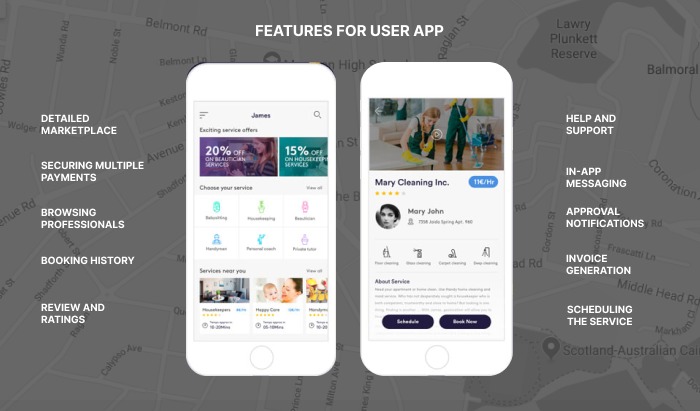
This part of the home services app features list has one job: make a booking feel safe and easy. Every feature below shortens the path between needing help and having a trusted professional at the door, so build it around speed and clarity.
Finding and booking a service
The first item on the home services app features list is a clear marketplace on the home screen. Each service needs a short snippet that sets expectations, and a detail view that explains price, inclusions, and what the visit involves. Customers who understand what they are buying cancel less and complain less.
Add filters so customers can search by price, distance, specialization, and rating. Then add scheduling, so they can pre-book a time slot instead of waiting for the next available professional. Scheduling is what lets a home services app serve planned work such as cleaning and installation, not only emergencies.
Staying informed and in touch
Real-time notifications tell the customer when a professional accepts the request, is on the way, and has arrived. Pair them with in-app chat, which is faster than calling and keeps the details of the job in one place. Encrypt the messaging channel, since customers share addresses and access instructions.
Ratings and reviews close the loop. Harvard Business School’s Michael Luca found that a one star increase in Yelp rating raised revenue by 5 to 9 percent for independent restaurants. That is a restaurant study, but the lesson carries over: visible ratings do the work a brand would otherwise do.
Finally, give customers a help and support section with FAQs, chat support, and a phone or email contact. Most problems are routine, and a findable answer is cheaper than a support ticket.
Paying and keeping records
Offer several payment options, including credit and debit cards, a wallet, and cash, because customers have strong habits. Use a payment gateway that follows PCI DSS so card data never touches your own servers. Secure payment is a trust feature before it is a convenience feature.
Generate invoices automatically and send them by email or text, with the option of a short or detailed version. Keep a booking history with dates, professional details, and past spending, so customers can rebook their best professional in a tap. Repeat bookings are where the business earns its margin.
Features for the Service Provider App
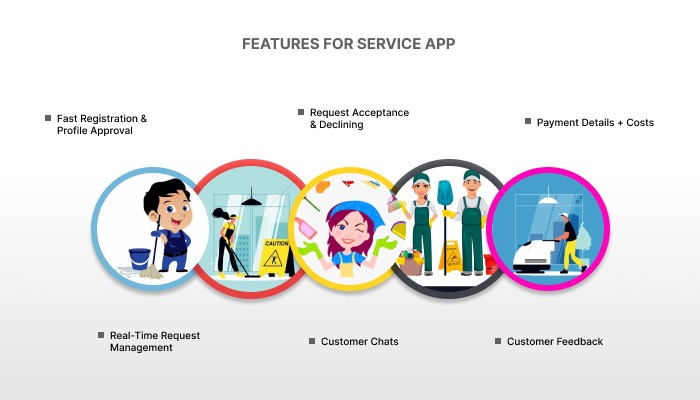
On any home services app features list, the provider side is the supply engine, and supply is harder to replace than customers. Design their app for a person standing in a hallway with a phone in one hand, who wants to know the job, the pay, and the address in seconds.
Joining and managing jobs
Registration should be fast, with document upload and a clear approval status. Once an admin approves the profile, jobs are matched by specialty and location. Slow onboarding loses good professionals, so keep the form short and verify the details behind the scenes.
Deliver requests through push notifications, text, and email, and let the professional accept or decline with one tap. Research on TaskRabbit data in Management Science found that standardized tasks and local density drove growth, so structured job cards with a clear scope help matching. Monitor acceptance rates instead of punishing every refusal, since fair treatment keeps good providers.
Communicating and getting paid
Give professionals in-app chat to confirm scope, negotiate where the model allows it, and share access details. Add payment details such as bank or wallet information, and a way to list extra charges such as travel fees when a customer lives far away.
An earnings view showing completed jobs, pending payouts, and fees builds trust quickly. Add a feedback feature where professionals rate customers on factors such as clear directions and respectful behavior. Two-way ratings protect your supply side as much as they protect customers.
Features for the Admin Panel
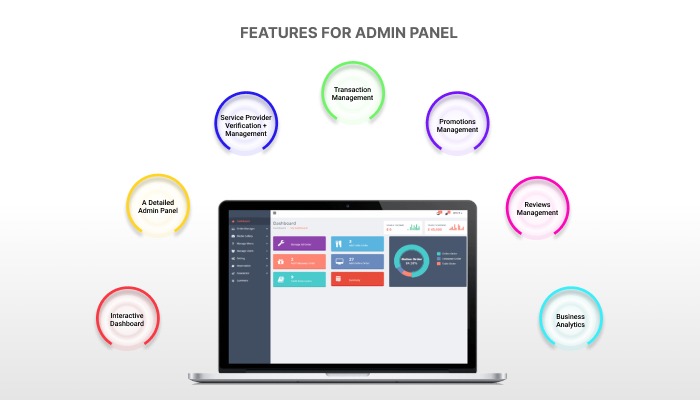
The admin items on a home services app features list are where the business is actually run. It decides whether you can scale a second city or whether every new booking creates a new fire to put out, so give it the same design care as the customer app.
Control and verification
An interactive dashboard works as the control center: bookings, revenue, active professionals, and complaints in one view, with reports that are easy to export. Behind it, build provider management, with manual onboarding for new professionals and ID and document checks to block fraudulent sign-ups.
Role-based access lets different staff see only what they need. This matters more as your team grows, because support agents, finance staff, and city managers should not share the same permissions.
Money and growth
Transaction management should make every payment traceable, with clear rules for commission, refunds, and payouts. In OyeLabs’ TaskRabbit-style script, admins set commission globally or per category, and typical settings run from 10% to 25%. Define the rules before launch so disputes have an answer already written down.
A promotions manager lets you run discounts, first booking offers, and referral rewards, and shows which ones actually produced bookings. Keep a close watch on cost per booking, since an offer that brings one-time customers can cost more than it earns.
Quality and insight
Reviews management lets you read feedback from both sides, flag low performers, and reward top professionals. Add dispute management, so complaints and refund requests follow a clear workflow instead of a long email thread.
Business analytics turns all of this into decisions. Track repeat booking rate, professional response time, cancellation rate, and revenue by category and area, and use them to decide where to add supply and which services to retire.
Security, Compliance, and Trust Features
Customers are really buying trust, so treat security as part of the home services app features list and not as an afterthought. Verified professional profiles with ID and document checks, masked phone numbers in chat, and a clear cancellation and refund policy protect both sides. Add a report or emergency contact button, so customers and professionals can flag a problem during a job.
On the data side, plan for the privacy rules of each market, such as GDPR in Europe, CCPA in California, India’s Digital Personal Data Protection Act, and the data laws of the UAE and Saudi Arabia. Use PCI DSS compliant payment gateways, encrypt personal data, and give admins role-based access. Publish a privacy policy that explains which location, order, and payment data you collect and why.
Quality systems matter just as much. Two-way ratings, dispute workflows, and payment records give you evidence when a complaint arrives, while insurance or a service guarantee gives customers a reason to book through you instead of an unvetted stranger. These are the features that turn a first booking into a habit.
Advanced Features Worth Adding in 2026
Once the core loop works, a few additions to the home services app features list separate a serious platform from a basic booking form. Add them one at a time, based on your own data, because each one adds cost and complexity.
| Feature | Why it matters | When to add it |
|---|---|---|
| AI provider matching | Assigns the best professional by skill, distance, rating, and availability | After a few thousand bookings, once there is data to learn from |
| Instant quote requests and AI quote generator | Speeds up custom jobs such as painting or repairs | When quote-based categories grow |
| Recurring bookings and smart scheduling | Locks in repeat customers for cleaning and maintenance | Early in version two |
| Service bundles | Packages several services for a higher order value | Once customers book more than one service |
| Corporate accounts | Lets businesses book for several locations | When commercial demand appears |
| Booking abandonment recovery | Reminds customers who left a booking unfinished | When traffic is steady |
| AI support agent | Handles routine questions and reduces support load | When support volume justifies it |
| Multi-market and multilingual support | Adds languages, currencies, and right to left layouts | Before entering a second country |
Treat the AI items on your home services app features list as multipliers, not foundations. Smart matching and quote generation only help when you already have bookings, ratings, and job data to learn from. Launch with a working booking loop, then add intelligence where the data shows a real bottleneck.
Choosing Features by Business Model
The right home services app features list depends on how you earn and who does the work. A fixed price catalog needs strong scheduling and recurring plans, while a quote-based marketplace needs job posting and negotiation tools. Pick your model first, using our overview of home services business ideas, then adjust the list.
| Business model | Features to prioritize | Features to delay |
|---|---|---|
| Fixed price catalog (single or multi category) | Service catalog with set prices, scheduling, recurring bookings, ratings, commission controls | Bidding and negotiation tools |
| Quote-based marketplace | Job posting, instant quote requests, in-app chat, milestone or escrow-style payments, reviews | Large fixed catalogs and bundles |
| Own technicians (service company) | Technician scheduling and dispatch, live tracking, job reports, customer invoices | Open provider registration and marketplace commission tools |
| Hybrid platform | Catalog plus quotes, provider verification, wallet, promotions, and dispute management | Corporate accounts and multi-market features until demand appears |
If your plan looks closer to hiring local fixers on demand, read our guide to Uber for handyman app development, which shows how the same features change when jobs are small and urgent.
How to Prioritize Features and Plan the Cost
Not every item on a home services app features list belongs in the first release. Start with the MVP rows in the table above, which cover booking, payment, ratings, verification, and commission. Anything that does not help a first booking complete safely can wait for version two.
The most common mistake when planning a home services app features list is building the admin panel last. Teams polish the customer app, then discover that nobody can approve professionals, refund a payment, or see why bookings fail. Build all three products together, test them with real jobs in one neighborhood, and cut any feature that does not help a booking finish safely.
Cost follows scope. As a planning range, a focused MVP with one or two service categories can start near $10,000, while a full multi category platform with all three apps typically runs $20,000 to $50,000 or more. These are OyeLabs estimates, not a quotation. For a detailed breakdown, read what an on-demand home service app costs to build, and confirm the figure after discovery.
The technology you choose also moves the price. Cross-platform frameworks such as Flutter or React Native share one codebase across iOS and Android, while native apps suit heavy device features. A good mobile app development partner will compare the options against your budget and timeline, and plan the backend so new features can be added without a rebuild.
Your business model shapes the feature list as well. A quote-based marketplace needs bidding and negotiation tools, the way an app like TaskRabbit does, while a fixed price platform needs a strong catalog. Review the main home services business models before you finalize the list.
Building Your Home Services App With OyeLabs
OyeLabs builds custom home services apps for marketplace founders, service companies, and franchises, with ISO 9001 and CMMI Level 5 certifications. Every build covers the home services app features list above through a customer app, a service professional app, and an admin dashboard, available on web, iOS, and Android, with App Store and Google Play submission.
In the Quick Home Services case study, an on-demand home assistance app for the United States, we gave each professional a profile card with certifications, languages, and a video introduction. We used MangoPay for split and frozen payments with European KYC compliance, and built real-time chat on socket.io.
Founders who want to test a city first can start from the TaskRabbit clone script and add custom modules later. If you are still comparing models, our guides to building an app like TaskRabbit and an app like Airtasker show how the same features change by market.
Conclusion
A strong home services app features list starts with trust and ends with scale. Build marketplace search, scheduling, secure payments, ratings, and verification first, give professionals a fast and fair app, and give admins the controls to run quality. Add AI and bundles when your own data asks for them.
A home services app features list is only half the plan, though. Pair it with a clear model, a launch zone you can supply, and a team that has built marketplaces before. For the full launch process, read our guide on how to develop an on-demand home services app, and talk to our team when you are ready to scope yours.
Frequently Asked Questions
What features does a home services app need?
A home services app features list starts with a customer app with marketplace search, filters, scheduling, notifications, chat, secure payments, ratings, and invoices. It also needs a provider app for registration, job requests, earnings, and chat, and an admin panel for verification, commission, transactions, promotions, reviews, and analytics.
What are the main types of users in a home services app?
There are three: the customer who books and pays, the service provider who accepts and completes the job, and the admin who verifies professionals, sets commission, resolves disputes, and monitors performance. Each user has a separate app or panel, but all three run on one shared backend.
What is the most important feature of a home services app?
Trust features matter most: verified professionals, visible ratings and reviews, and secure payments. Customers are inviting a stranger into their home, so these features decide whether a first booking becomes a repeat booking. Booking and scheduling come next, since they make the service easy to use.
Which features should be in a home services app MVP?
An MVP should include service browsing, filters, scheduling, notifications, in-app chat, secure payment, ratings, provider registration and approval, request management, earnings tracking, a dashboard, provider verification, and commission settings. Promotions, dispute workflows, recurring plans, and AI features can wait for version two.
How is AI used in home services apps in 2026?
The most practical uses are intelligent provider matching, AI quote generation for custom jobs, a support agent for routine questions, and demand analytics. They work best after launch, when you have enough bookings, ratings, and job data to train and test them reliably.
How much does it cost to build a home services app?
As a planning range, a focused MVP with one or two categories can start near $10,000, while a full multi category platform with all three apps typically runs $20,000 to $50,000 or more. Final cost depends on features, platforms, integrations, and the team, so confirm it in a written quotation.
How do home services apps make money?
Most earn a commission on each booking, set globally or per category by the admin. Other revenue streams include provider subscriptions, listing fees, featured placement, customer convenience fees, and referral commissions. A common approach is to start with commission and a booking fee, then add streams later.
Can I launch a home services app quickly?
Yes. A ready-made script can launch in about seven business days after branding assets and server access are shared, while a customized or fully custom platform takes longer. Start with the MVP features, test one city, and add advanced features as demand proves the need.
Sources and Editorial Notes
Sources
- The Business Research Company: Online On-Demand Home Services Global Market Report (2026)
- Urban Company: Shareholders’ Letter and Results, Q4 FY26
- Cullen, Z. and Farronato, C. (2021), Outsourcing Tasks Online, Management Science
- Luca, M.: Reviews, Reputation, and Revenue: The Case of Yelp.com (Harvard Business School working paper)
Editorial Notes
- Last updated October 26, 2026. Market figures are analyst projections, and definitions of the home services market differ between research firms.
- Urban Company figures come from its Q4 FY26 shareholders’ letter. The Luca study covers independent restaurants and is cited as an analogy for service businesses.
- Cost figures are OyeLabs planning ranges, not quotations. Final price depends on scope, platforms, integrations, and the team you choose.
- Urban Company, UrbanClap, TaskRabbit, Airtasker, Yelp, and MangoPay are referenced only to describe market context. OyeLabs has no affiliation with any of them.