
How To Build An App Like TaskRabbit In 10 Easy Steps

How To Build An App Like TaskRabbit In 10 Easy Steps
 Anuraag Jain
Last Updated on December 26, 2025
Key Takeaways- What You’ll Learn: TaskRabbit connects people needing help with local freelancers for small home services. The platform works as a two-sided marketplace with task posters and taskers. Trust, speed, and local availability drive user adoption in home service apps. Separate apps for users, taskers, and admins improve experience and control. Continuous updates are required to stay relevant in on-demand services. Stats That Matter: TaskRabbit operates in thousands of cities across eight countries worldwide. Users saved over 4 million hours using TaskRabbit services. Taskers earn around $35 per hour in the United States.
TaskRabbit is an on-demand online marketplace that is meant to assist customers in finding the required services such as plumbing, carpentry, gardening, deep house cleaning, etc. It forms a bridge between customers and service providers. This is beneficial to the people who prefer a quick service over cost. It lets people outsource small jobs or tasks in the community and help them make some money too. People have saved 4 million hours by hiring taskers through TaskRabbit in the past 10 years. The app was launched in 2008 by Leah Busch and has become one of the top home services app startups today. TaskRabbit is also recognized as an innovative website that provides them with a helping hand to get neighbors together. Since then, it has grown significantly and now operates as a global marketplace in thousands of cities across eight countries including the United States, the United Kingdom, Canada, and several European nations. After expanding nationwide, TaskRabbit is now available in all 50 U.S. states, connecting people with trusted Taskers for a wide range of services. With its special, innovative idea of managing small tasks, it has also made a popular mark in the on-demand economy. Here are some facts about the company 1) TaskPosters: TaskPosters are the people who are willing to outsource certain jobs who can post their job requirements on this app by linking them to the skilled professionals who are eligible for support here. 2) TaskDoers: TaskDoers are the people who are unemployed, or underemployed, or could be those who are ready to build some extra money for themselves by just signing up for the TaskRabbit app. However, to become a tasker, your background will be scrutinized, viewed and followed by a quiz and an interview. Taskers will be offered a job and they can either accept it or can neglect it as per their needs. Related Read: How Does Taskrabbit Work? Payments The aim of posting this section is to provide an overview of the on-demand home service application features and functionalities. The creation of marketplace apps includes three distinct tables. One for end-users, the other for service providers, and the third for administrators. Marketplace The first unique feature in your on-demand services apps such as TaskRabbit is a marketplace. You should list the services to be preferred to the users in the opening screen itself. This feature should be a forum to display all your services. By clicking on the various categories, users will go to the specific page of the category listing all service choices. Reviews And Rating In the booking process, evaluations and feedback received from the customer by the service providers play a very important role. Of course, the greater the ratings and favourable feedback, the higher the reservations received by a service provider. In order to allow this, your users should be given the opportunity to leave comments and opinions on the service provider’s experience. In-App Chat Features There is no disagreement about the importance of messages in calls. In the on-demand home services, even the same importance is preserved. Also in your application, you should be able to contact users and service providers in the in-app chat facility in real time. One thing that should be noted here is that a secure, encrypted interaction platform should be provided to them. Booking Features The functionality is ideal for end-users as well as providers of services. End-user reservation function: users can use the function to reserve a service immediately or schedule it for later. You can also reset the service if it is not possible to do so within the time limit. Reservation functionality for service providers: the providers can access the reservations they have made via this application. You will have the option to approve or cancel your reservation. Tracking Features Your end-users should be able to monitor service providers – how far they reach the destination and where they are. This gives you a good picture of the time for your visit. In-App Payment Gateway You can give users the ease to pay by offering a safe payment gateway within the application. While the options for paying for the services at home are still available to consumers, nothing stacks the convenience and ease of having a payment feature in the app. By giving your users the ease to pay on a safe platform for their service, you give them an additional incentive to visit the app. Service Invoice Automatic creation of invoices that can be forwarded/accessed at any time after the operation. When the service ends, you can send the customers the invoice for the same. You may also send an invoice to them by e-mail or by a short SMS, along with a separate section under the Orders tab. Booking History This feature is used to help the users to access their reservations and their payments, as well as the details of who the service providers were. The feature gives the consumer two advantages on the usability front. Help Section You and your partners must maintain a very clear communication line. The application’s support or communication section should be explicitly identified on the menu list in order to discourage stakeholders from wasting time looking for it. This feature in the application should also include a FAQ where stakeholders can themselves, with minimal support, find answers to their questions. Push Notifications You and your partners need to maintain a very direct line of communication. To prevent stakeholders from spending time searching for it, the help or contact portion of the application should be clearly listed on the menu list. This feature in the application should also include a FAQ where stakeholders can find answers to their questions themselves, with limited help. Search Filter Search filters can be added to ensure simplicity which helps a client find the right contractor. Service providers or taskers shall share the background check information. The following specifics may be included in the panel. Both the End-User and Service Provider Panel features will turn out to be harmful if any reliable technology does not back them up. The characteristics below help to keep all parties in sync: Related Read: Complete Home Services App Features List Move away from some sort of technology and get a pen and paper out there, and decide what you want to accomplish with your application. The starting line in the word for app creation is a pen and paper, not complicated encoding and design. Ask yourself the following questions, to gain better clarity on this thing: To make your TaskRabbit like application a success, you need to be clear about the following topics: Your Target Users An app should always be built in the mind of an application’s target users. Enhance an app’s performance ratio by providing a specific vision of the target audience. Your Supported Mobile Platforms Mobile platforms and devices should be selected with respect to hardware performance, battery life, robustness and the peripherals required. Some considerations that need to be taken into consideration when choosing mobile platforms and devices include availability, user support, performance and other features. Your Revenue Model The demand for technology is booming, as never before. To ensure this resource and generate revenue, the app developer must choose the appropriate home services business model according to the requirement. There are various revenue generation methods from mobile devices that include paid devices, separate freemium apps and in-store, ads, subscription and pay for a download. These strategies can be used to generate revenue. However, the method of the developer must be in line with the standard. Attracting the customer and investing money on the different aspects of the application is highly important for the developer. In the world of technology, a wireframe is a glamorized storyboard of your application. This is where you take your sketch and concept idea, and add a little more clarity and functionality to the idea. That will become the basis for the creation of your apps, so it’s really a crucial step. There are hundreds of wireframing websites that you can use to help put your drawings with features like click-through and icons into digital life. The trick is to find one you like and that’s easy to use. You left off with your wireframe so you’ve got a storyboard at this stage in your app creation about how you want your app to function. Now it’s time to start testing features using the storyboard. You’ll need to delineate your servers, APIs, and data diagrams using your wireframe. There are some trusted developers at Oyelabs that can give you the resources to do this with ease. And also do if it’s about you. If you’re not sure what this technical jargon entails, you should probably hire a good mobile app development company. Whatever method you want to use to build your app, it is important that simple diagrams are developed, as they serve as instructions for anyone working on your project. If you are having some technical problems, revising your wireframe should represent some changes. Next step, a prototype is built after the solution has been established. In reality, it is the process of taking your concept and translating it into an application with some simple functions. A prototype makes it easier to sell your application to potential customers who can now see the concrete benefits rather than just imagine or read the product description. In attracting investors and collaborating with producers, and seeking licensees, it is very effective. You can also share with beta testers the concept app to get an idea of what needs to change to make it a good mobile app. Particularly while working on a project, ensure that you take action against unauthorized use and access to data to protect your product. This is where you have to call in the troops. Present your demo to friends, family, and everyone else able to make critical critiques of you. Do not waste your time on people who are going to tell you, “Oh, that’s cool.” Watch out for those cynics and detractors. At this point raw honesty is key. Don’t be afraid to take a peek over their shoulder while they review your prototype to see how they’re doing stuff. If you have to change some of the configurations or navigation routes, do so. Keep in mind your users, and try to suit their reasoning, not yours. With this phase, your end goal is to finalize the framework and foundation of your apps. Before you start adding functionality you need to have your app brains working to prevent confusion later in the process. Launching an app requires that release movement be prepared, scheduled and regulated for testing and living environments. Deployment Management’s main goal is to ensure the credibility of the live environment is secured and to release the correct components. Creating a basic MVP in the start with only the required features is more advisable as you can get proper feedback from customers and upgrade accordingly. Mobile apps consumers have gone up dramatically in the last decade. The need to collect reliable measurements is therefore of utmost importance. As the number of customers using mobile apps is gradually growing, it is becoming increasingly important to collect reliable metrics from these. Unfortunately, web analytics uses many of the approaches used to calculate apps. Major metrics we should keep in mind: After seizing the metrics, it’s possible to enhance your app with improvements and unique features. A mobile app with no advanced features will lose its long-term usability. Upgrading your app with innovative features enhances its accessibility along with downloading the app. Also make sure that you keep updating your app to meet the new guidelines offered by the various platforms, don’t let your apps stagnate. These are among the steps that should be taken into account when developing the app. Using these steps, you can make an app to ensure long-term success. However, it is almost impossible to lay down the exact steps that are important for the overall success of the app. Although this does not come under the steps of “making” an app, making your app effective is certainly crucial. If you do not market your app well once it has been released, there is a high chance that it will be lost in the multitude of apps available in different stores. So make sure your app market is good. This is a bonus step to creating a successful mobile app, but it is highly recommended that you use it for your own benefit.
TaskRabbit ‘s estimation of the cost of creating apps would depend on a variety of factors, but the most noticeable ones are the choice of platform and the cost of designing the mobile app.
App development costs on the basis of developer’s location Now if you want to adopt the collection of technology and the feature lot we listed in the article to its maximum extent, the cost of developing the TaskRabbit clone app will be in the range of USD 35,000 to USD 50,000.
But what’s important to remember here is that there’s a way to increase or decrease this cost, mainly in platform choice and front design. When built on Native platforms, the cost of creating apps like TaskRabbit – either on an individual Android or iOS platform – will cost far more than the one created on a cross-platform system either React Native or Flutter.
The other factor which decides on costs is the design of mobile apps.
Although the method of fixing the design after completing the Design Framework and UX research process is typical for all aspects of the app, it is the form of inclusion of design elements that raises or lowers the cost of mobile app design for on-demand home services.
The more comprehensive or creative the concept, the greater the cost of creating apps such as TaskRabbit will be. Another aspect that helps in determining the cost of creating the TaskRabbit-like app is the size of the team that will be involved in its development process.
How Can You Build an App Like TaskRabbit? You can build a TaskRabbit-like app by partnering with an experienced on-demand app development company that understands service workflows, required features, and the right technology stack. How Do Apps Like TaskRabbit Make Money? Such apps earn revenue mainly through service commission fees and surge pricing during peak demand periods. How Should I Choose the Right Development Team? You can either build an in-house team or outsource the project to a professional app development company for faster and more cost-effective execution. How Long Does It Take to Build an App Like TaskRabbit? A basic version takes around 4–6 months, while a fully featured app may take up to 8–10 months, depending on complexity. What Features Are Essential in a TaskRabbit-Like App? Core features include service listings, task booking, secure payments, real-time chat, reviews, and an admin dashboard. Want to launch an app for household services? Know How to Develop an On-Demand Home Services App
Founders
Founded on
Headquarter
Total Funding Raised ($)
Leah Busque
2008
San Francisco, California
$1.8 million
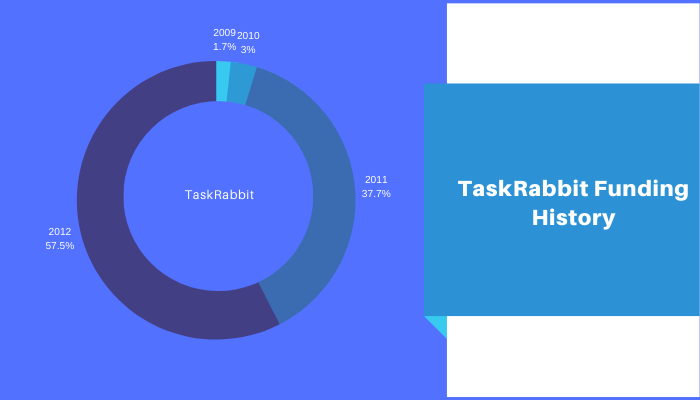
Segments of TaskRabbit User
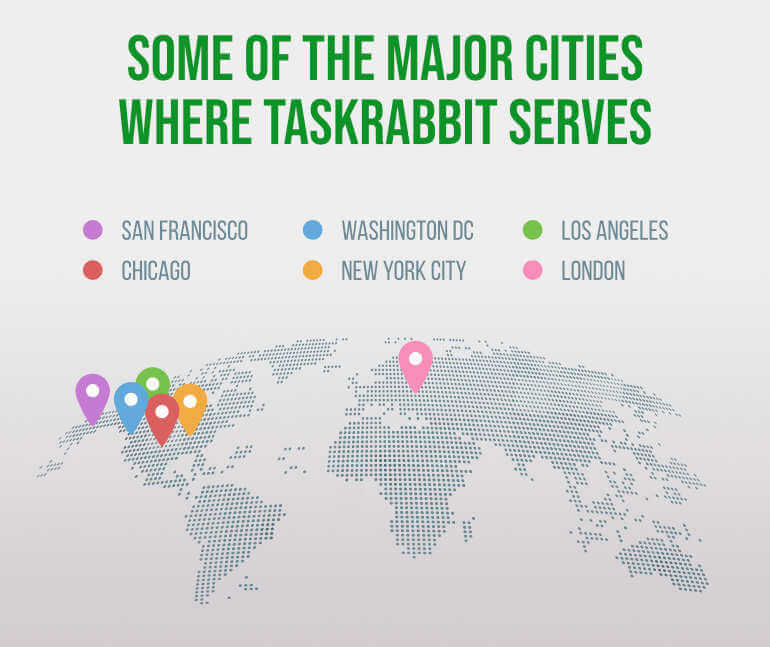
Some of the major cities where TaskRabbit serves:-
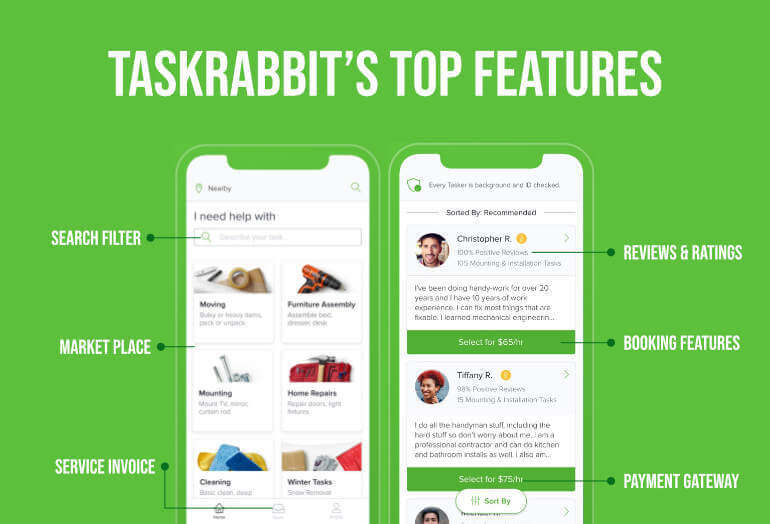
TaskRabbit’s Top Features
End-User Panel
Freelance Service Provider Panel
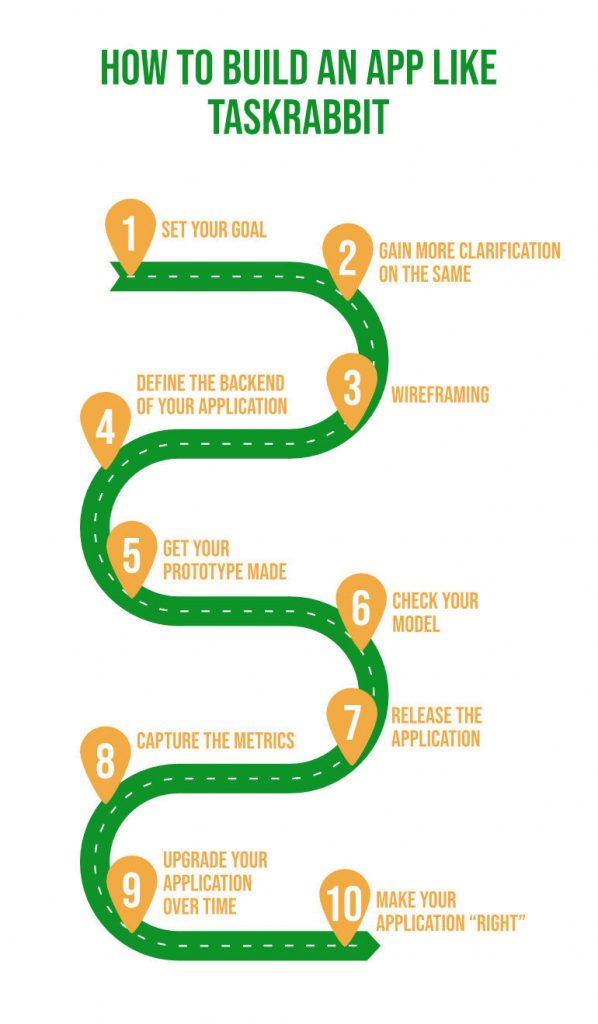
How To Build An App Like TaskRabbit In 10 Easy Steps
Step 1- Set Your Goal
Step 2 – Gain More Clarification On The Same
Step 3 – Wireframing
Step 4 – Define The Backend Of Your Application
Step 5 – Get Your Prototype Made
Step 6 – Check Your Model
Step 7 – Release The Application
Step 8 – Capture The Metrics
Step 9 – Upgrade Your Application Over Time
Step 10 – Make Your Application “Right”
READY TO LAUNCH YOUR APP?
Technology Stack Of TaskRabbit
How Much Does It Cost To Build An App Like TaskRabbit
Complexity
Features
Time Estimate
Simple
No API integration
No back-end
Basic UI components
Simple features (email subscription, social login, calendar, etc.)
400+ hours
Medium
Custom UI/UX features
Build-in payment gateway
API integration
Back-end server
500-800 Hours
Complex
Multi-language support
3rd-party integrations
Custom animations
Complicated back-end
Custom UI/UX design
Real-time features via database integration
800-1500 Hours
Regions
Rates
India
$20 – $40 per hour
Australia
$100-$150 per hour
North America
$110 -$170 per hour
Western Europe
$60 – $150 per hour
Eastern Europe
$100-$150 per hour
FEATURE
TIME ESTIMATE
User Login
20+ hours
Push Notification
24+ hours
Navigation Bar
40+ hours
GeoLocation
24+ hours
In-App Messaging
60+ hours
Database
26+ hours
Frequently Asked Questions (FAQs)